










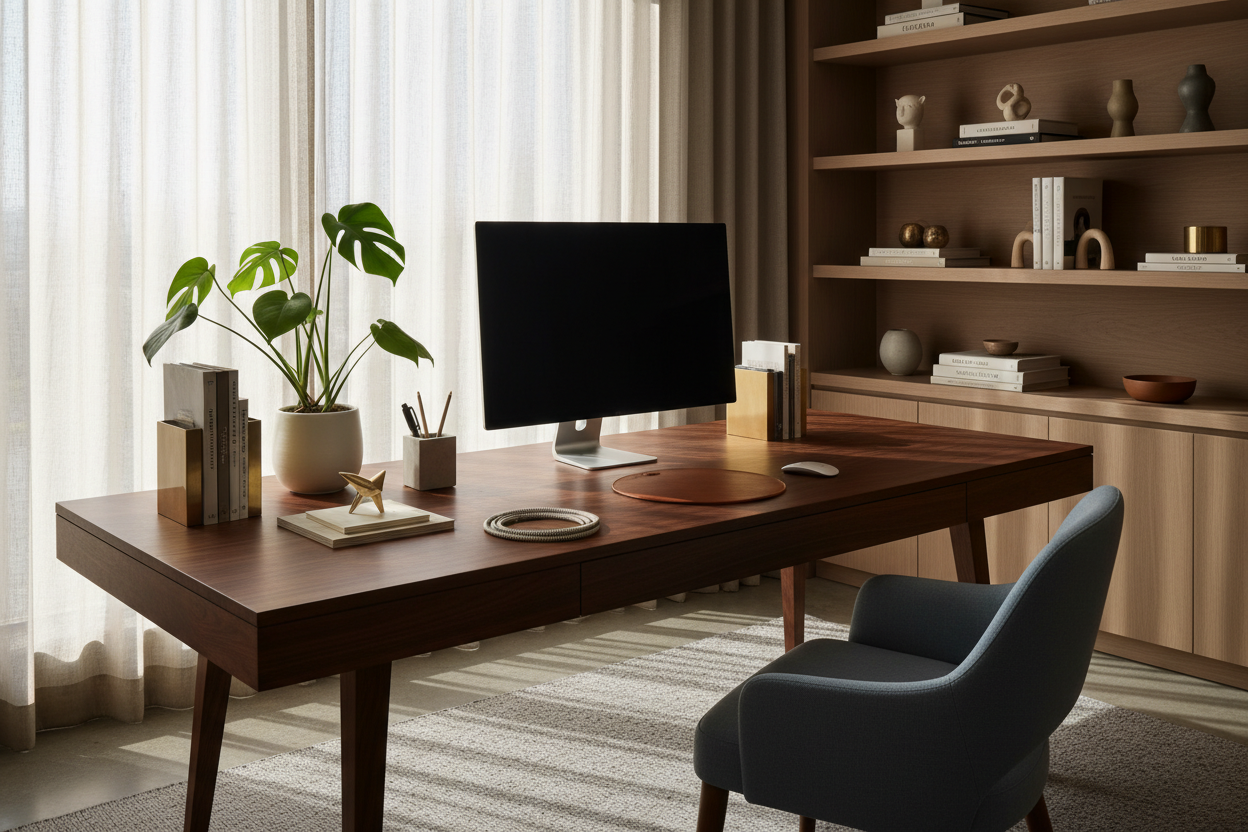
There is a distinct difference between a cluttered surface and a curated workspace. As designers, we often see clients treat their desks as dumping grounds rather than creative command centers. The goal is not just to fill space, but to introduce elements that enhance focus while expressing personal taste. By carefully selecting desktop decoration ideas that balance ergonomic function with aesthetic weight, you can create a vignette that feels intentional rather than accidental.
Quick Decision Guide: Styling Your Desk
- Scale & Proportion: Ensure decor items do not impede the movement of your mouse or the positioning of your monitor. The rule of thumb is 60% negative space, 40% active space.
- Material Palette: Opt for natural materials like full-grain leather, walnut, or brass that develop a patina, rather than cheap plastics that degrade.
- Lighting Temperature: Choose lamps with a CRI (Color Rendering Index) above 90 to reduce eye strain and render colors accurately.
- Visual Weight: Anchor the desk with one substantial piece (like a structured blotter) and layer lighter accessories around it.
Establishing Visual Hierarchy
When styling a desktop, we must consider the "skyline" of the workspace. If every item is the same height, the arrangement looks flat and uninspiring. Conversely, too many tall items create a sense of enclosure and claustrophobia.
The Triangle Method
Arrange your primary desktop decor ideas in a loose triangle configuration. For example, your monitor serves as the apex. A sculptural desk lamp on one side and a grouped vignette of a tray and plant on the other form the base. This guides the eye naturally across the surface without causing visual friction.
Softening the Tech Hardness
Modern workspaces are dominated by the rigid lines of screens and keyboards. To counteract this "tech hardness," introduce organic shapes. A hand-thrown ceramic pen cup or a smooth, tumbled stone paperweight introduces necessary irregularity. This textural contrast is essential for a luxury aesthetic.
Materiality and Tactile Feedback
Because you are in physical contact with your desk for hours, the tactile quality of your decor is paramount. Low-quality veneers peel, and acrylics scratch easily.
Leather vs. Felt
For desk mats—the foundation of desktop styling—I often recommend full-grain leather over felt. While felt is popular for a soft, cozy aesthetic, it tends to "pill" under the friction of a mouse after a few months. Leather, however, offers a smoother glide and develops a rich patina that tells the story of your work over time. It anchors the space with a sense of permanence.
Metals and Reflections
Be wary of high-polish chrome or glass accessories. While they look sleek in a showroom, they often reflect monitor glare directly into your eyes. Brushed brass, matte black powder coats, or oxidized copper are superior choices; they absorb light rather than bouncing it, reducing visual fatigue.
Integrating Functional Lighting
Lighting is not just a utility; it is a sculptural element. A common mistake is relying solely on overhead ceiling cans, which cast harsh shadows. Introduce a task lamp with an adjustable arm. Look for a fixture that offers a "cutoff" angle, ensuring the bulb is not directly visible to the eye, but rather directs a pool of warm light onto your documents. This creates a focused zone of productivity.
Lessons from My Own Projects
I learned a hard lesson about desktop decoration ideas early in my career while designing a home office for a graphic designer. I prioritized a stunning, high-gloss marble riser to elevate her monitor. It looked architectural and pristine.
Three weeks later, she called me. She wasn't using it. The issue wasn't the look; it was the thermodynamics and sound. Every time she set her coffee cup down or tapped her stylus on the marble, it made a sharp, distracting clack. Furthermore, the stone felt uncomfortably cold against her wrists during long editing sessions.
We swapped it for a solid walnut shelf with cork feet. The wood absorbed the sound, felt warmer to the touch, and eliminated the micro-distractions. It taught me that desktop decor must be judged by how it sounds and feels just as much as how it looks. Always test the "clatter factor" before committing to a material.
Conclusion
Elevating your workspace requires a subtractive approach. Start by clearing the surface, then reintroduce items that serve both a purpose and a visual need. By focusing on natural materials, proper scale, and glare-free finishes, your desk becomes more than a workstation—it becomes a piece of functional art.
Frequently Asked Questions
How do I style a small desk without it looking cluttered?
Verticality is key. Use a monitor riser with storage underneath to hide notebooks. Limit your decor to one "hero" object (like a small succulent or a brass tray) and keep the rest of the surface strictly for active work tools.
What is the best way to hide cables on a glass desk?
Glass desks are unforgiving. Use adhesive cable clips that run along the back of the metal legs. Alternatively, use a "spine" cable manager that mimics the desk's hardware finish to route cords from the floor to the surface seamlessly.
Can I mix wood tones on my desktop?
Yes, but keep the undertones consistent. If your desk is a warm walnut, accessories in cherry or oak work well. Avoid mixing warm, reddish woods with cool, ashy grey woods, as this creates visual dissonance.

Leave a comment
This site is protected by hCaptcha and the hCaptcha Privacy Policy and Terms of Service apply.