










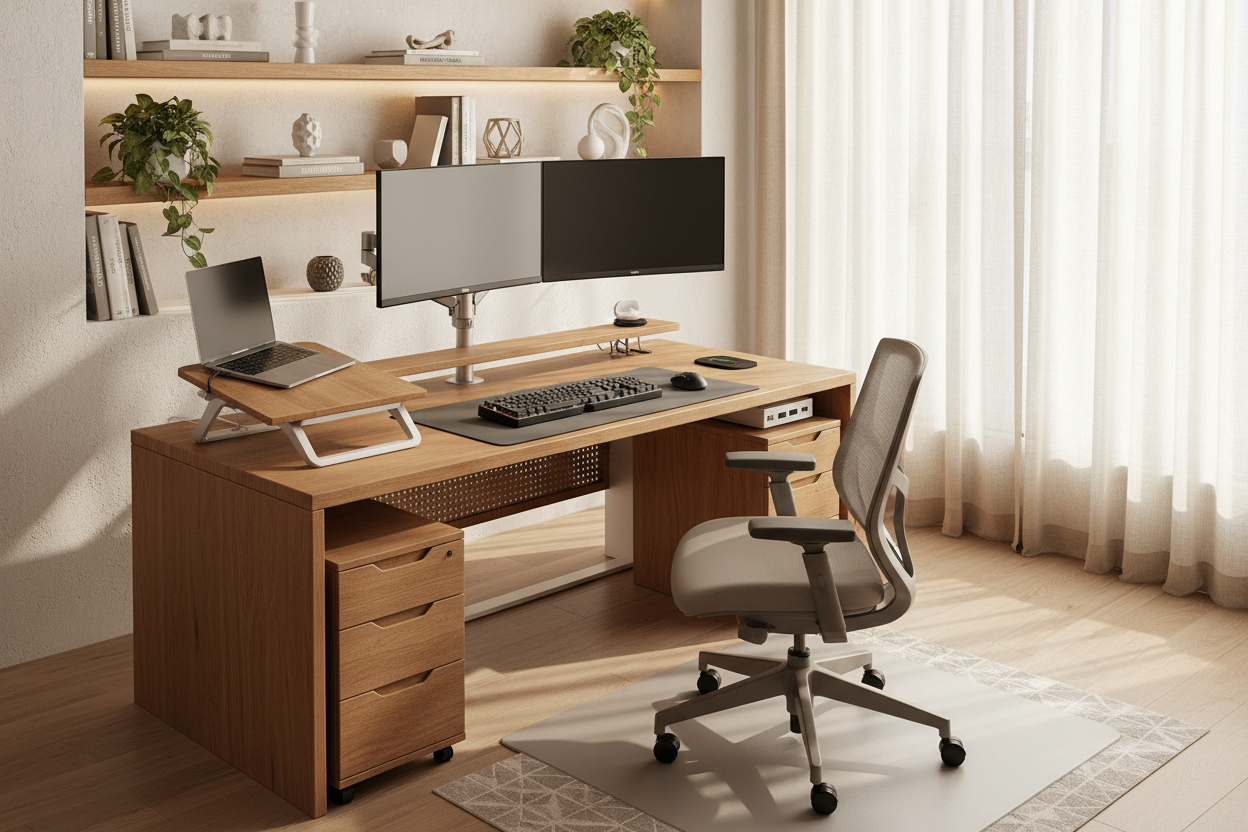
You have likely experienced the frustration of finding a desk that fits your aesthetic perfectly but lacks the functional storage you need. Conversely, ergonomic powerhouses often lack the visual warmth required for a curated living space. This is why sourcing individual desk components is the secret weapon of interior designers. By decoupling the surface from the frame and storage, you gain control over the silhouette, material quality, and ergonomic performance of your workspace.
Quick Decision Guide: Selecting Your Components
If you are planning to build a custom setup, prioritize these four elements to ensure longevity and functionality:
- Surface Material: Opt for hardwoods (walnut, oak) for longevity, or high-pressure laminate (HPL) for scratch resistance in high-traffic zones.
- Weight Capacity: Ensure the frame or legs can support the desktop plus at least 20% more than your equipment load (monitors, PC towers).
- Ergonomic Height: Look for adjustable legs or frames that range from 22" (seated) to 48" (standing) to accommodate various postures.
- Cable Management: Verify that the desktop has grommet holes or that the frame includes an integrated cable tray to maintain visual minimalism.
The Art of the Surface: Choosing Your Desktop
The desktop is the primary tactile touchpoint of your office. When selecting desk components for home office layouts, the material dictates both the maintenance required and the atmosphere of the room.
Solid Wood vs. Engineered Materials
In high-end residential projects, I almost always advocate for solid wood. Materials like Walnut or White Oak develop a patina over time that adds character. However, they require climate control to prevent warping. For a more utilitarian approach, high-quality veneers offer the look of wood with a stable MDF core, resisting humidity changes better than solid planks. Avoid honeycomb-core tops if you plan to use clamp-mounted monitor arms, as the pressure can crush the internal structure.
Structural Integrity: Legs and Frames
The visual weight of your desk is determined by what lies beneath. A heavy, dual-motor standing desk frame offers ergonomic utility but can look industrial. To soften this, consider powder-coated finishes in matte white or sage rather than standard black.
For a static setup, trestle legs provide a classic architectural look but check the knee clearance. A common design oversight is placing bulky storage components where your legs should naturally rest. Ensure a minimum of 24 inches of width for leg space to maintain comfort during long sessions.
Functionality: Storage and Connectivity
Home office desk components must bridge the gap between IT requirements and residential decor. Modular drawer units that slide underneath the desk allow you to keep the desktop clear. Look for units with soft-close joinery and castors, allowing you to reconfigure the layout if your workflow changes.
Furthermore, consider the "under-desk landscape." A high-quality cable management spine or a modesty panel is essential if the desk floats in the center of the room, ensuring the chaotic wiring doesn't disrupt the room's focal point.
My Personal Take on Desk Components
I learned a hard lesson early in my career regarding the interplay between heavy monitor arms and desktop finishes. I once specified a stunning, high-gloss lacquered desktop for a client who insisted on a heavy-duty dual monitor mount. Within three months, the constant torque and minor vibrations from typing caused the clamp to create a spiderweb crack in the lacquer that was impossible to repair invisibly.
Now, whenever I source components for a setup involving clamps, I insist on using a reinforcement plate (a thin steel sheet) between the clamp and the desk underside. It distributes the pressure and saves the finish. It’s a five-dollar component that saves a thousand-dollar desktop. Also, if you are buying a solid wood top, run your hand underneath. If it's not sealed on the bottom just like the top, it will absorb moisture unevenly and eventually bow—always check the underside finishing.
Conclusion
Curating your own desk components allows you to transcend the limitations of mass-market furniture. By carefully selecting a surface that invites touch and a frame that supports your workflow, you create a workspace that is not just a utility, but a permanent asset to your home’s design.
Frequently Asked Questions
Can I mix desk components from different manufacturers?
Absolutely. This is the beauty of a custom build. However, always double-check the mounting hole patterns. You may need to drill your own pilot holes if the desktop brand differs from the frame brand. Ensure you have the correct screw length to avoid piercing through the top surface.
What is the ideal depth for a home office desk?
For a standard setup with a laptop, 24 inches is sufficient. However, if you use external monitors, I recommend a depth of 30 inches. This allows you to maintain proper focal distance from the screen, reducing eye strain and leaving room for a keyboard and notepad.
How do I stop a standing desk frame from wobbling?
Wobble is usually caused by loose hardware or uneven floors. First, retighten all hex screws on the frame. Second, adjust the leveling glides on the feet. If the desk is on a high-pile carpet, the instability is inevitable; consider using a carpet spike mat or moving the desk to a hard surface.

Leave a comment
This site is protected by hCaptcha and the hCaptcha Privacy Policy and Terms of Service apply.