










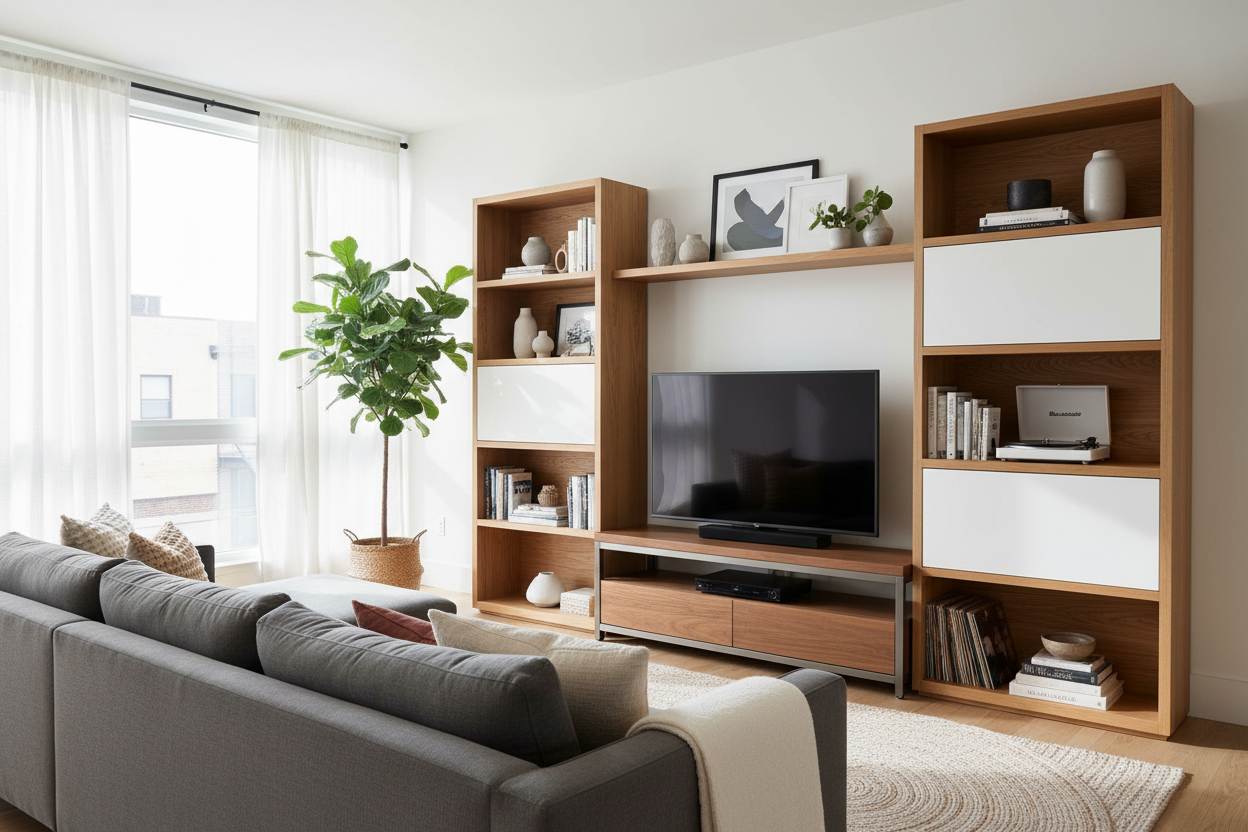
We have all walked into a living room where a massive, black rectangle dictates the entire layout. It feels less like a home and more like a home theater waiting for the previews to start. If your living area feels visually unbalanced, your tv stand and entertainment center is likely the culprit. You are about to learn how to properly scale, style, and select media furniture so it anchors your room without dominating it.
Quick Decision Guide
- The Width Rule: Your console should be at least 4 to 6 inches wider than your television on both sides to prevent a top-heavy, unstable look.
- Viewing Height: The center of your screen should sit at eye level when seated, which is typically about 42 inches from the floor.
- Depth Matters: Allow at least 15 to 18 inches of depth to accommodate modern receivers, gaming consoles, and adequate cable management.
- Storage Balance: Aim for a ratio of 70% closed storage and 30% open display to hide ugly cords while showcasing curated decor.
Nailing the Proportions in North American Homes
Whether you are dealing with an open-concept suburban build or a compact urban apartment, proportion is everything. A common mistake I see is buying media furniture that exactly matches the width of the television.
The Wider is Better Rule
When shopping for television furniture stands, always scale up. If you have a 65-inch television (which is roughly 57 inches wide physically), you need a console that is at least 65 to 70 inches wide. This creates a stable visual foundation. Negative space on either side of the screen gives the eye a place to rest and provides a surface for a structural lamp or a trailing plant to soften the hard edges of your electronics.
Material Quality and Living Room Realities
Your media center works incredibly hard. It holds heavy equipment, routes dozens of hot cables, and often sits in high-traffic zones where kids and pets play.
Solid Wood vs. Engineered Solutions
While solid oak or walnut offers incredible longevity and a rich, organic texture, high-quality engineered wood with a real-wood veneer is often more practical for tv units stands. Engineered wood resists the warping that can occur from the ambient heat generated by electronics. However, strictly avoid paper-thin laminates; they will peel at the edges the moment you bump them with a vacuum cleaner.
Managing Visual Weight
A large wall unit can easily swallow a room. If you have low ceilings (under 8 feet), avoid towering asymmetrical units that draw the eye up to a cramped ceiling. Instead, opt for a low-profile, elongated console that grounds the space.
Taming the Tech Clutter
Look for pieces with slatted wood doors or acoustic fabric-front panels. These clever materials allow infrared remote signals and sound to pass right through, meaning you can hide your soundbar and bulky cable boxes completely out of sight without sacrificing functionality.
A Designer's Honest Take
Early in my career, I convinced a client to invest in a stunning, matte-black floating media console. It looked incredibly sleek on installation day. However, I learned the hard way that matte dark finishes are absolute dust magnets. Within 48 hours, every speck of dust and pet hair was visibly glowing in the afternoon sun. Furthermore, because it was floating, routing the heavy power bricks for their gaming systems through the wall was a logistical nightmare. The drywall had to be opened up twice just to fit the thick HDMI bundles. Now, I almost always recommend floor-standing units with built-in cable channels for anyone with heavy A/V setups. The floating look is beautiful, but the daily maintenance and installation headaches rarely justify the aesthetic payoff.
Frequently Asked Questions
How wide should my media console be?
Your console should be a minimum of 4 to 6 inches wider than the total physical width of your television. This provides essential visual balance and prevents the setup from looking top-heavy.
How do I hide cords on an open-back unit?
Use zip ties, velcro straps, and adhesive cable clips to route wires strictly along the metal or wood legs of the unit. You can also paint a plastic cord cover to match your wall color for wires running down from a mounted screen.
Is it better to wall-mount the TV or use the stand?
Wall-mounting saves surface space for decor and creates a cleaner silhouette, but resting it on the console is perfectly fine if you rent or frequently rearrange your layout. Just ensure the furniture is weight-rated for your specific television.


Leave a comment
This site is protected by hCaptcha and the hCaptcha Privacy Policy and Terms of Service apply.