










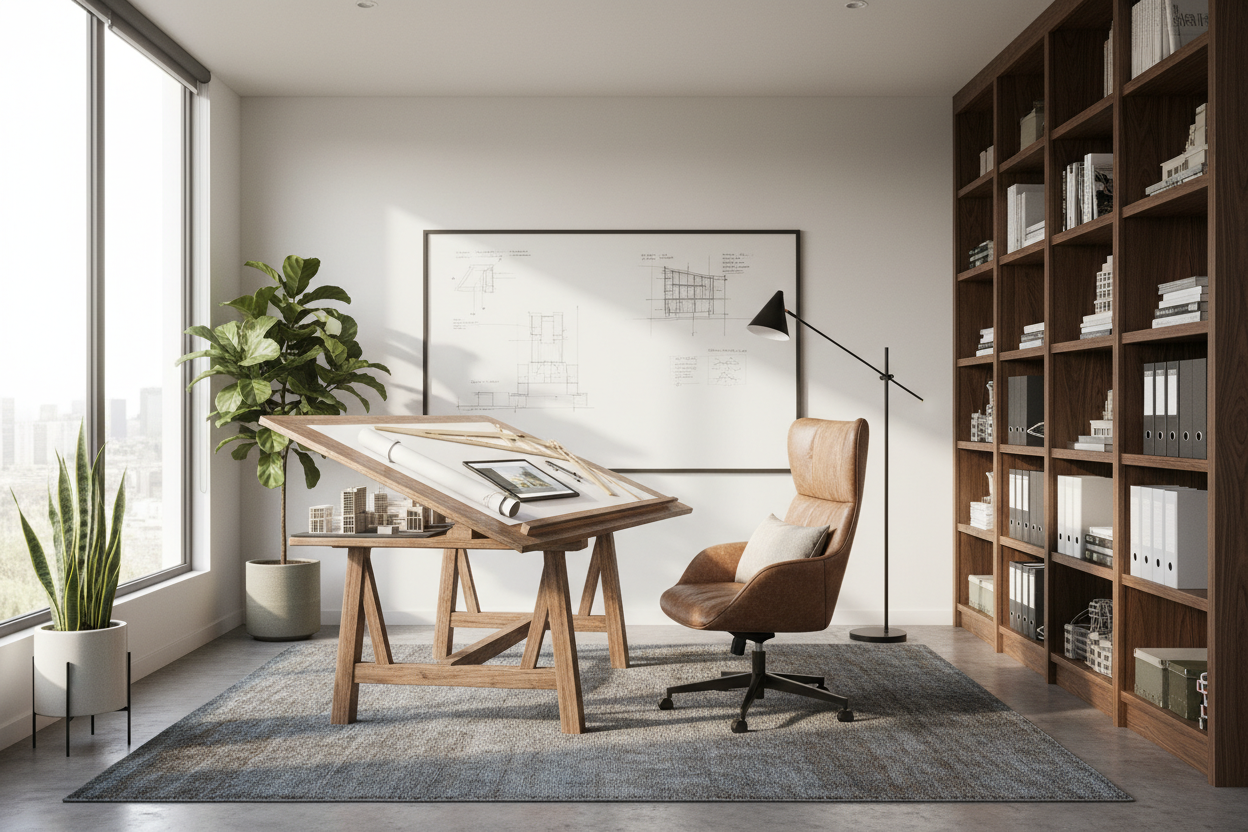
There is a distinct difference between a room with a desk and a workspace that genuinely facilitates creative flow. As a designer, I see many professionals struggle with makeshift setups that stifle productivity rather than encourage it. Whether you are an actual architect drafting blueprints or a creative professional seeking that disciplined, structural aesthetic, the goal is the same: clarity of mind through clarity of space. In this guide, we will dissect exactly how to achieve the home office architect look and functionality, transforming a chaotic spare room into a studio worthy of your best work.
Key Features of an Architect's Workspace
- Surface Depth: Standard desks (24 inches deep) are often too shallow for blueprints and A3 sketchpads; look for 30-36 inches.
- Lighting Quality: High CRI (Color Rendering Index) lighting is non-negotiable for accurate material sampling and color work.
- Material Honesty: Focus on raw, honest materials like solid oak, plywood, or linoleum rather than synthetic veneers.
- Modular Storage: Flat-file storage or cubbies are essential for housing large-format paper and plans without folding them.
Structuring Your Layout: The "Zone" Approach
When looking at home office architects and their personal studios, you will notice a common thread: zoning. In small office home office architecture, you rarely have the luxury of endless square footage, so the layout must be deliberate. Avoid pushing your desk flush against a blank wall if possible. Floating the desk creates a command position, allowing for better circulation and a more authoritative view of the room.
If you are designing a home office for architect workflows, consider an L-shaped configuration or a back credenza. One surface is dedicated to the digital realm (monitors, keyboard), while the perpendicular or rear surface remains completely clear for analog work—sketching, reviewing plans, or laying out material finishes. This separation prevents your keyboard from encroaching on your drafting space.
The Desk: Selecting the Right Silhouette and Material
The desk is the focal point. For an architect home office setup, the silhouette should be clean and unencumbered. Trestle legs or sawhorse bases are classic choices because they visually communicate "work in progress" and stability. However, pay close attention to leg placement; ensure the trestles don't interfere with your swivel chair's radius.
Materiality and Tactility
Visually, glass desks appear sleek, but they are often cold to the touch and create distracting reflections. I generally advise clients to opt for a desktop linoleum or a matte-finished solid wood. Linoleum offers a slight "give" that is excellent for writing and drawing, and it doesn't reflect overhead light, reducing eye strain during long drafting sessions.
Lighting: Beyond the Ambient
Architects understand light better than anyone. A single overhead ceiling fixture will cast shadows directly over your work surface. To achieve professional-grade illumination, layer your lighting. Start with diffuse ambient light, then add a dedicated task lamp with an adjustable arm—like the classic angle-poise style. Ideally, position your desk perpendicular to a window to harvest natural daylight without the glare of direct sun hitting your screens.
Lessons from My Own Projects
I want to share a specific mistake I made early in my career when designing my own home studio. I was obsessed with the "all-black" minimalist aesthetic. I specified a matte black, high-pressure laminate desk surface. It looked stunning in photos.
However, within a week, I realized the error. If you do any manual drafting or sketching, you generate eraser crumbs and graphite dust. On a black surface, this debris looks messy instantly. Furthermore, the natural oils from my wrists left "ghost marks" on the dark laminate that required constant cleaning. I eventually swapped it for a birch ply top. It hides dust, feels warmer, and develops a nice patina over time rather than looking greasy. If you actually use your desk for drawing, prioritize a forgiving surface over a moody aesthetic.
Conclusion
Designing a workspace with an architectural eye isn't about buying the most expensive chair; it's about understanding how you move and work within the space. By prioritizing deep surfaces, honest materials, and layered lighting, you create a room that respects the creative process. Take the time to measure your reach and assess your lighting—your productivity will thank you.
Frequently Asked Questions
What is the ideal desk height for an architect's home office?
While the standard desk height is 29-30 inches, many architects prefer a drafting height (36-42 inches) paired with a drafting stool. This allows you to stand or sit without breaking flow, which is beneficial for reviewing large drawings.
How do I handle storage in a small architectural office?
Verticality is key. Use wall-mounted shelving that goes floor-to-ceiling to maximize small office home office architecture. For plans, if you don't have space for a flat file, use rolled storage tubes stored in a tall wire basket or a grid wall system.
What color temperature is best for a design office?
Aim for 4000K (Cool White). This temperature is closest to neutral daylight and ensures that when you are selecting paint colors or fabric swatches, you aren't being misled by the yellow tint of warm white (2700K) bulbs.


Leave a comment
This site is protected by hCaptcha and the hCaptcha Privacy Policy and Terms of Service apply.