










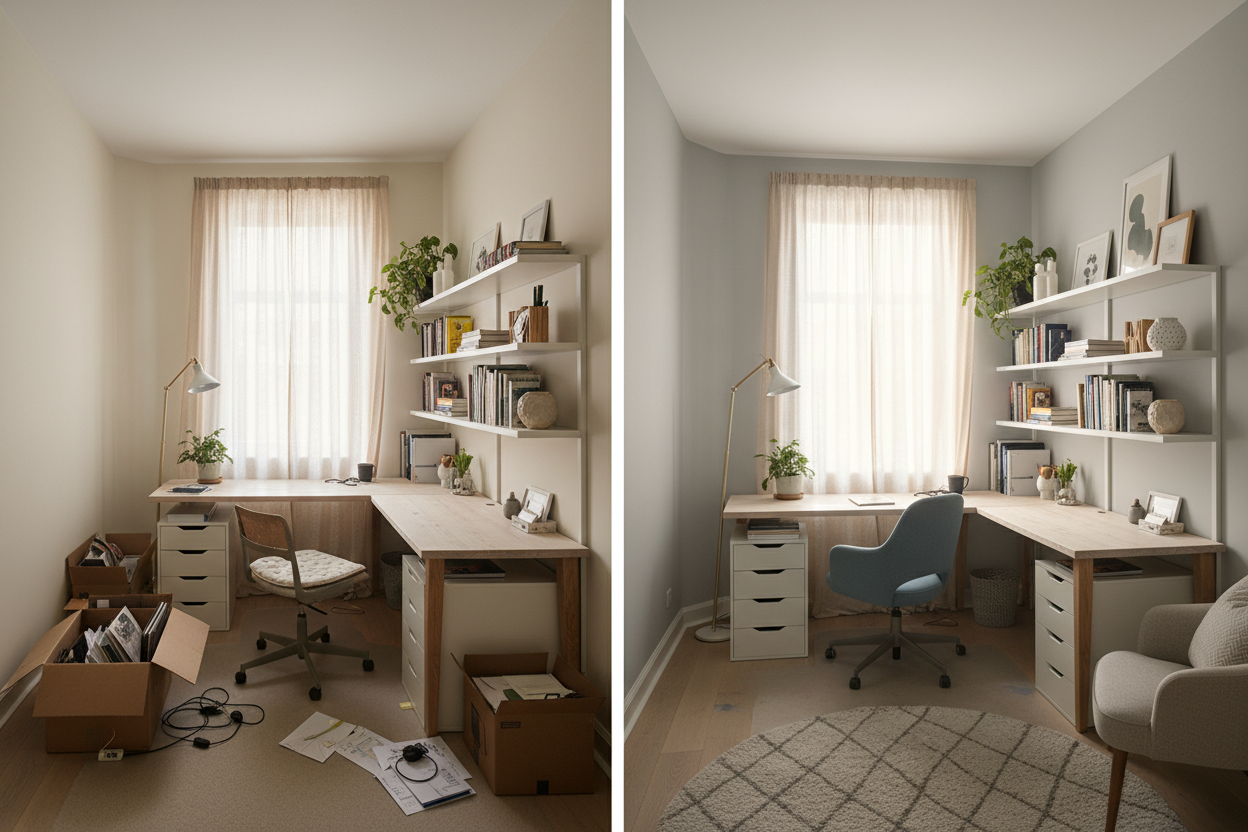
We have all seen it happen. What started as a temporary laptop setup on a folding table has slowly morphed into a permanent fixture in the spare bedroom, complete with a tangled nest of charging cables and stacks of unsorted mail. When your workspace feels chaotic, your workflow inevitably suffers.
Executing a proper home office make over is about much more than buying a matching desk set or painting an accent wall. It requires a strategic approach to ergonomics, lighting, and visual weight. By the end of this guide, you will know exactly how to assess your current room, choose pieces that actually support your posture, and arrange a layout that makes you want to sit down and focus.
Quick Decision Guide
- Float the desk: Whenever space allows, pull your desk away from the wall to face the door. It creates a commanding position and reduces eye strain.
- Prioritize task lighting: Overhead builder-grade fixtures cast harsh shadows on your keyboard. Layer ambient light with a dedicated desk lamp.
- Invest in the chair, save on the desk: Your spine will thank you for an ergonomic chair. The desk is just a flat surface; allocate your budget accordingly.
- Manage visual noise: Closed storage is mandatory. Open shelving should be reserved for curated decor, not printer paper and tax documents.
Space Planning & Layout
Finding the Right Desk Placement
When reviewing a successful before and after office makeover, the most dramatic shift usually isn't the furniture itself—it is the floor plan. The default instinct for most homeowners is to shove the desk flat against the longest wall to maximize floor space. While this makes sense in a tiny room, it forces you to stare at blank drywall all day and puts your back to the entrance, which subconsciously increases stress.
If you have at least 100 square feet, try floating the desk in the center of the room or anchoring it perpendicular to a window. You need a minimum of 36 inches of clearance behind the desk to comfortably slide your chair in and out, and at least 48 inches if a bookshelf sits directly behind you.
Comfort & Ergonomics
The Truth About Aesthetic Desk Chairs
As a designer, I appreciate a beautiful mid-century modern bucket chair as much as anyone. But as someone who works at a computer, I know they are terrible for your posture. Upholstered dining chairs or rigid wooden seats lack the lumbar support, seat depth adjustability, and tilt mechanisms required for an eight-hour workday.
Look for a chair with a breathable mesh back, adjustable armrests that allow your elbows to rest at a 90-degree angle, and a seat pan that leaves about two inches of space between the edge of the chair and the back of your knees. You can always soften a highly technical, ergonomic chair by draping a textured throw blanket over the back when it is not in use.
Style & Coordination
Hiding the Tech Clutter
The hallmark of a stunning home office makeover before and after is the complete disappearance of visual clutter. Monitors, printers, and cables are inherently ugly. To blend a workspace into a residential home, you have to manage the tech.
Opt for a desk with built-in cable management trays or attach an aftermarket wire basket to the underside of the desktop. Route all cables down a single table leg using zip ties or a neoprene sleeve. For printers and shredders, utilize a credenza or a deep filing cabinet. Keeping the surface clear of everything except your immediate tools makes the room feel intentional rather than haphazard.
Designer's Honest Take
I learned a hard lesson about workspace trends a few years ago when I designed my own studio. I painted the entire room—ceiling included—a deep, moody charcoal gray and bought a stunning solid walnut desk with brass inlay. It looked incredible in photos.
But within a month, I realized my mistake. The dark walls absorbed all the natural light, making me feel incredibly lethargic by 2:00 PM every day. Worse, the beautiful walnut desk had a porous matte finish. Every time I set down a coffee mug or brushed my watch clasp against the edge, it left a permanent mark. I eventually had to repaint the room a warm, light-reflecting taupe and cover the desk with a custom-cut leather blotter. The takeaway? Never sacrifice your daily comfort and functional durability for an aesthetic trend.
Frequently Asked Questions
What is the best desk size for a small room?
For a laptop and a single monitor, a desk that is 48 inches wide and 24 inches deep is the absolute minimum for comfort. If you use dual monitors or need space to review physical documents, look for a desk at least 60 inches wide and 30 inches deep.
How do I make a shared home office work?
Avoid sitting side-by-side if possible, as it limits elbow room and increases distraction. Instead, place desks on opposite walls, or use a single long table placed perpendicular to a wall so you sit facing each other with computer monitors acting as a visual barrier.
Can I put a desk in my living room?
Yes, but it requires strict visual boundaries. Use a console-style desk that blends with your living room furniture, and rely on a rolling storage cart that can be tucked into a closet at the end of the day. A desk in a living area must look like a curated piece of furniture, not a corporate cubicle.


Leave a comment
This site is protected by hCaptcha and the hCaptcha Privacy Policy and Terms of Service apply.