










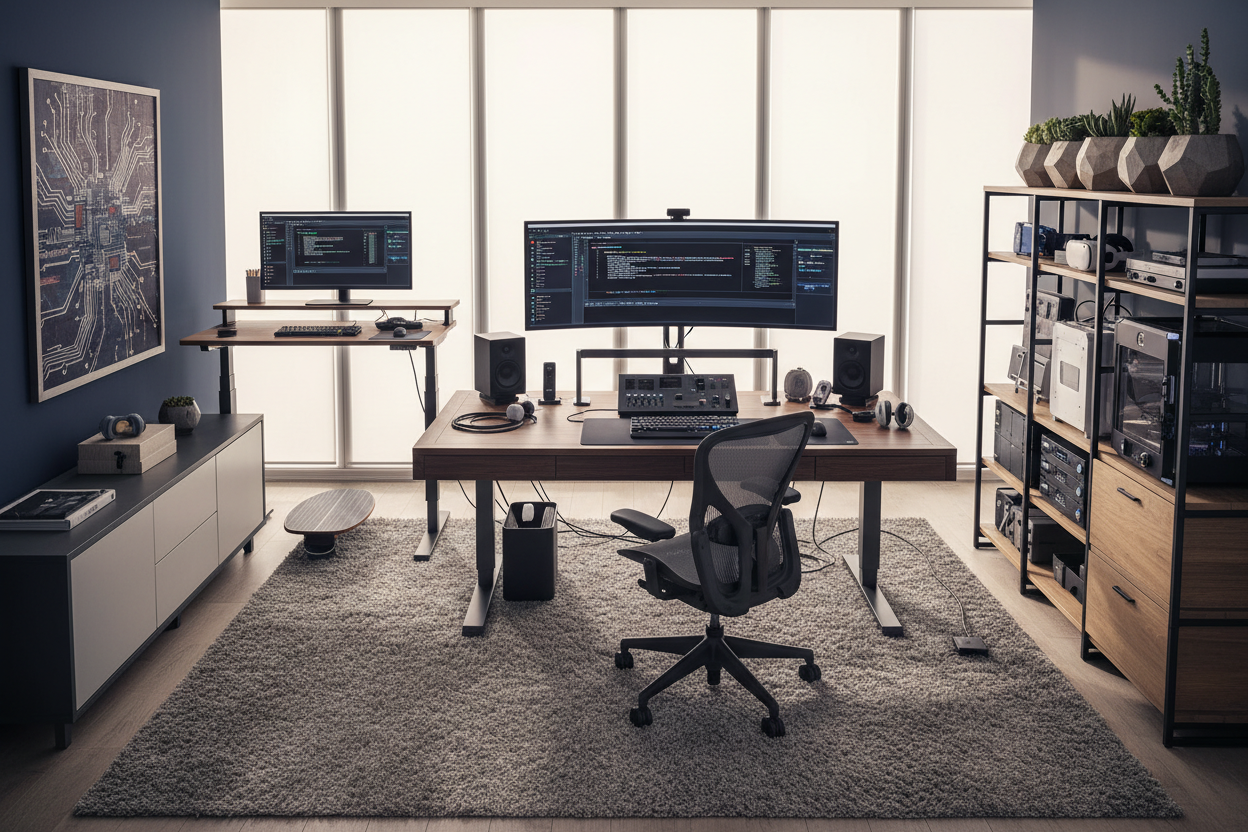
Most home office inspiration photos feature a delicate writing desk, a single sleek laptop, and a vase of peonies. But when clients tell me they work from home in it, I know that fragile aesthetic goes out the window. You are dealing with multiple 27-inch monitors, heavy mechanical keyboards, docking stations, and enough cables to power a small commercial building.
The challenge is not just making the room look presentable. It is designing a layout that supports intense focus and heavy-duty hardware without making your spare bedroom look like a corporate server room. Whether you are coding, managing databases, or handling network security, here is how to balance heavy tech requirements with residential style.
Quick Decision Guide for Tech-Heavy Offices
- Prioritize depth over width: A standard 24-inch deep desk is too shallow for dual monitors; aim for 30 to 36 inches to reduce eye strain.
- Invest in commercial-grade seating: Skip the trendy velvet accent chairs. Look for high-density foam or mesh task chairs with adjustable lumbar support.
- Plan wire management immediately: Desks with built-in cable trays or modesty panels will drastically reduce visual clutter.
- Use heavy-duty monitor arms: Free up valuable desk real estate and improve your posture by mounting screens directly to the desk edge.
Space Planning & Layout
The Desk Depth Rule for Multiple Monitors
When you do work from home IT support or development, your job often demands significant screen real estate. The biggest mistake I see clients make is buying a standard 24-inch deep desk. Once you add dual monitors and a keyboard, you are sitting mere inches from the screens. For a proper ergonomic setup, you need a desk depth of at least 30 inches. If you use ultra-wide monitors, push that to 36 inches. This gives your eyes a break and provides enough negative space for notebooks or tablets.
Managing Visual Weight
Tech equipment carries a lot of visual weight. Dark monitors, black PC towers, and thick cables can quickly make a room feel heavy and cramped. To counteract this, choose furniture with a lighter silhouette. A solid wood desk with clean, straight lines paired with closed storage cabinets helps hide the chaos. Keep the PC tower off the floor using a dedicated CPU holder mounted under the desk, which also protects it from dust and pet hair.
Comfort & Ergonomics
Seating That Survives 12-Hour Shifts
If you are pulling long hours troubleshooting servers, your chair is your most critical investment. The aesthetic dictates that a sleek leather bucket seat looks best, but your spine will disagree. You need a chair with independent seat pan tilt, adjustable armrests, and breathable mesh or performance fabric. The physical details separate a chair that looks good in photos from one that actually supports your body through a long sprint.
Designer's Honest Take
I learned the hard way that a beautiful floating desk in the center of the room is a nightmare for a software engineer. A few years ago, I designed a stunning mid-century modern office for a client. We placed the desk dead center, facing the door. It looked incredible until move-in day.
Once the client brought in their dual monitors, heavy PC tower, and power strips, we had a massive cable management crisis. There was no wall to hide the cords against, and we ended up having to route cables through a bulky floor cord cover that ruined the rug. Now, if a client has a heavy tech load, I always anchor the desk to a wall or specify a desk with a fully integrated, enclosed modesty panel to hide the wiring. Never underestimate the aesthetic destruction of thirty black cables.
Frequently Asked Questions
What size desk do I need if I work from home in it?
For a standard tech setup with two monitors, aim for a desk that is at least 60 inches wide and 30 inches deep. This provides enough room for your screens, peripherals, and a comfortable ergonomic reach.
How do I hide cables without drilling into walls?
Use under-desk cable management trays and neoprene zipper sleeves. You can mount power strips directly to the underside of your desk using heavy-duty double-sided mounting tape, keeping all cords off the floor completely.
Are gaming chairs good for a professional home office?
While gaming chairs offer high backrests, their bucket-seat design often forces your shoulders forward, which is poor for posture. A high-quality ergonomic office chair provides better lumbar support and a more professional silhouette for video calls.


Leave a comment
This site is protected by hCaptcha and the hCaptcha Privacy Policy and Terms of Service apply.