










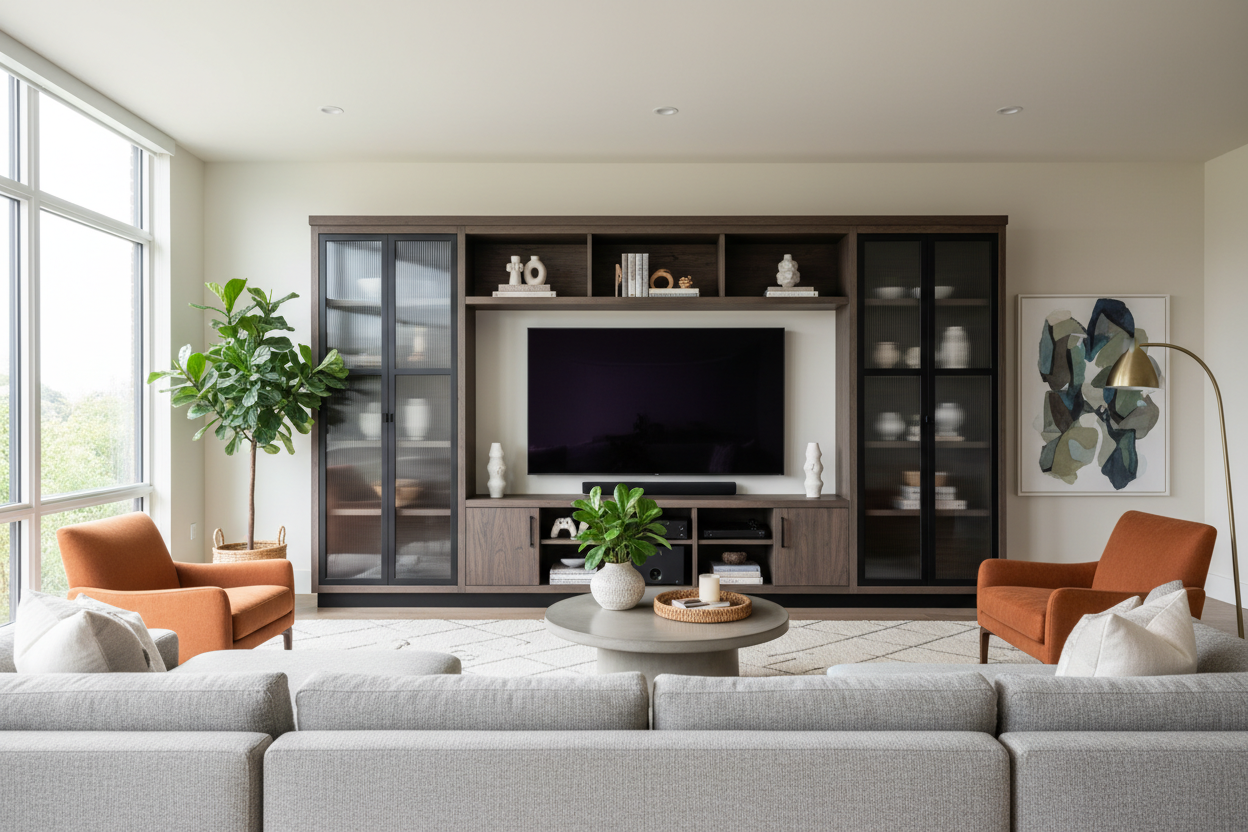
I remember the day my 85-inch screen arrived. I had this sleek, mid-century modern credenza that I absolutely loved, but once that black monolith was unboxed, the room felt broken. It looked like a billboard sitting on a toothpick. If you're currently staring at a screen that dwarfs your furniture, it's time to admit that entertainment centers large enough to actually hold these things are no longer a luxury—they're a design necessity.
We spent a decade trying to make our furniture disappear, but TVs kept growing. Now, we're left with a weird scale problem where the most expensive thing in our living room looks like it's about to tip over. It's time to stop being afraid of furniture with a little heft.
Quick Takeaways
- Visual balance is more important than 'minimalism' when dealing with massive screens.
- An undersized stand makes a large TV look like a giant 'lollipop.'
- The 6-inch rule: Your console should be at least 6 inches wider than your screen on both sides.
- Modern wall units offer massive storage without the clunky 90s oak aesthetic.
The 'Lollipop Effect' Is Ruining Your Living Room
If you put a 75-inch or 85-inch TV on a stand that is the exact same width as the screen, you've created a top-heavy nightmare. I call this the 'Lollipop Effect.' It makes the ceiling feel lower and the room feel unstable. Your eyes are constantly drawn to the precariousness of the setup rather than the movie you're trying to watch.
To fix this, you need a The Lollipop Effect Why You Need An Extra Large Tv Cabinet. A wider base provides the visual 'grounding' that a massive screen requires. It’s about creating a foundation that can actually support the visual weight of all that glass and plastic.
Why Minimalism Doesn't Work With Maximum Screens
The minimalist trend told us to hide everything. But you can't hide an 85-inch black rectangle. When you try to pair a massive screen with a tiny, spindly stand, the TV just looks like a mistake. It looms over the room like an uninvited guest. A substantial, large entertainment stand actually integrates the technology by framing it.
I’ve found that when you surround a screen with a piece of furniture that has actual presence, the TV starts to look like a deliberate design choice—almost like a piece of framed art. Many people ask, Does A Tv Cabinet Large Enough For Modern Screens Even Exist? The answer is yes, but you have to look past the standard 60-inch options that haven't updated their specs since 2012.
Going Wide vs. Going Tall
You generally have two paths when trying to anchor a big screen. You can go wide with a long, low-profile Tv Bench Large Entertainment Center. This is great if you have high ceilings and want to keep the room feeling airy. It gives you plenty of surface area for a soundbar or a few curated coffee table books without cluttering the vertical space.
The other option is the extra large entertainment center that takes up vertical real estate. This is the 'wall-filling' approach. If your room feels empty or echoey, adding height around the TV can actually make the space feel much cozier and more intentional.
The Return of the Wall Unit (But Make It Modern)
I know, 'wall unit' sounds like something from your parents' house with glass doors and dusty VCR tapes. But modern versions are different. We're talking clean lines, matte finishes, and integrated LED lighting. A modern Tv Hutch Large Entertainment Center provides a massive amount of storage for things you actually use—like gaming consoles, mesh routers, and those 47 remote controls.
The key difference today is the materials. We’re seeing kiln-dried hardwoods and powder-coated steels instead of the flimsy, peeling particle board of the 90s. These units are built to handle the weight of modern tech while offering a 'built-in' look that makes your living room feel like a custom-designed suite.
The 6-Inch Rule: How to Measure Before You Buy
Here is the math I swear by: Your console should be at least 12 inches wider than the TV in total (6 inches on each side). If you have an 85-inch TV, the screen itself is about 74 inches wide. That means you need an Entertainment Center that is at least 86 inches long. Anything less and you're back in lollipop territory.
Check the depth, too. Modern screens are thin, but their legs often have a wide footprint. I once bought a gorgeous walnut console that was only 14 inches deep, only to realize the TV's 'V' shaped legs required 16 inches. I had to shimmy the whole thing against the wall and it still felt sketchy. Measure the stand of the TV, not just the screen.
My Personal Lesson in Scale
Three years ago, I tried to save money by buying a cheap MDF unit for my 75-inch screen. Within six months, the center started to sag. Not only did it look terrible, but the doors stopped closing because the frame was warped. I eventually bit the bullet and bought a solid wood unit with a center support leg. It was twice the price, but it’s still perfectly level today. Don't put a $2,000 TV on a $150 stand; you'll regret it the first time you see that middle shelf start to dip.
FAQ
Is an 85-inch TV too big for a standard console?
Yes. Most standard consoles max out at 60 or 70 inches. For an 85-inch screen, you need a specialized unit that is at least 80 inches wide to maintain visual balance and structural integrity.
How do I stop a large entertainment center from looking too bulky?
Look for units with 'legs' rather than a solid base that goes to the floor. Seeing a bit of the floor underneath the furniture tricks the brain into thinking the piece is lighter than it actually is.
Should I wall mount the TV or sit it on the stand?
Even if you wall mount, you still need a large console underneath. A floating TV with nothing beneath it looks like it's drifting away. The furniture underneath provides the 'landing pad' that completes the look.


Dejar un comentario
Este sitio está protegido por hCaptcha y se aplican la Política de privacidad de hCaptcha y los Términos del servicio.