










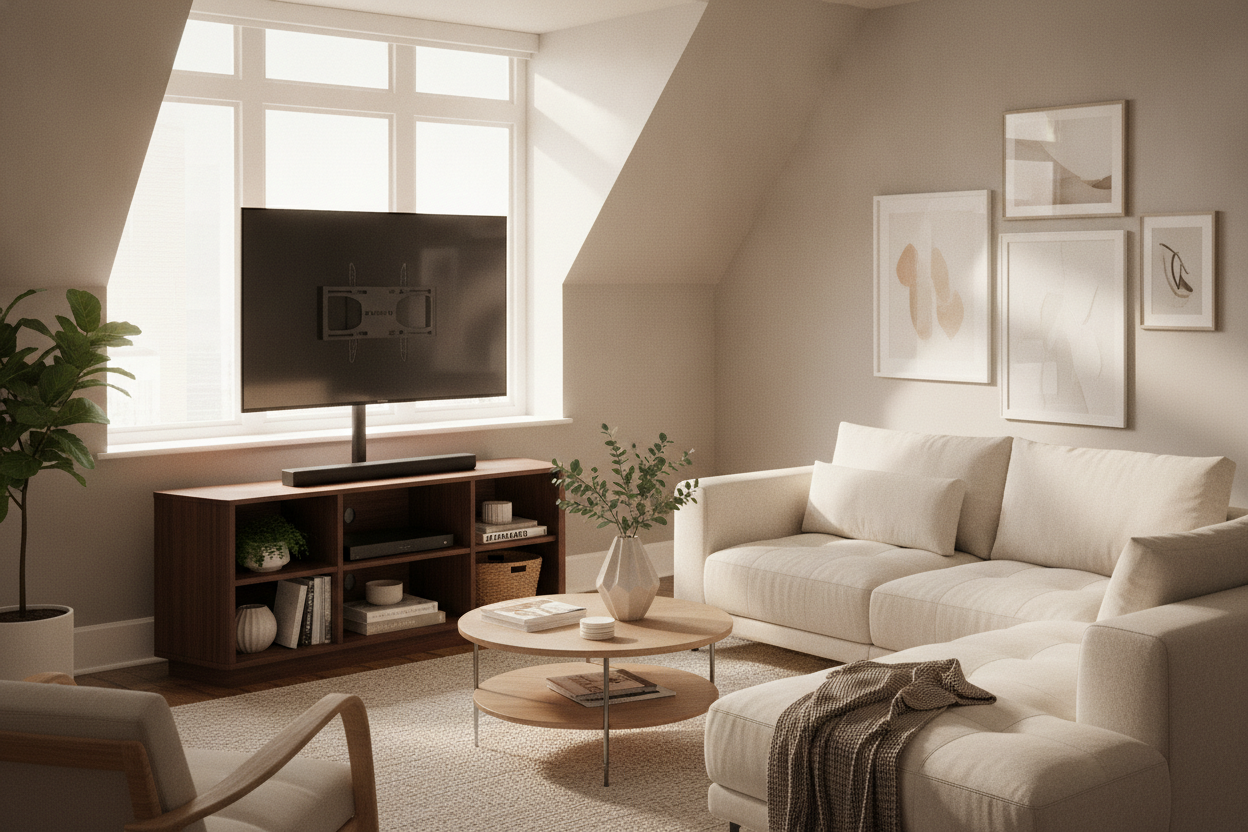
I spent three hours last Tuesday staring at my living room wall like it was a complex calculus equation. The only spot for the TV is a 45-degree corner sandwiched between a radiator and a floor-to-ceiling window. If I put a normal console there, it sticks out like a sore thumb, eating up three feet of floor space I don't have.
That’s when I realized a corner tv stand with tv mount is the only way to survive a weird layout. It’s the middle ground for people who want the 'floating' look but live in a rental or simply don't trust themselves with a stud finder and a heavy-duty drill.
Quick Takeaways
- Save your security deposit by skipping the wall-mounted brackets.
- Integrated mounts take up 40% less floor space than bulky corner cabinets.
- Swivel functions let you aim the screen at the kitchen or the couch.
- Built-in cable management hides the 'spaghetti' of wires behind a central pillar.
The Geometry Problem of the Corner TV
Most living rooms weren't designed for 65-inch screens. You’ve got the fireplace taking the 'main' wall, windows hogging the light, and a traffic path that forces your sofa into a specific corner. Putting a TV on a flat stand against a flat wall in these rooms usually means you’re watching Netflix at a neck-straining 30-degree angle.
Corners are the natural solution, but they are notoriously difficult to furnish. A standard rectangular stand leaves a massive, dusty 'dead zone' triangle behind it. A dedicated corner unit is better, but many of them look like they belong in a 1994 basement. It’s a waste of square footage in an apartment where every inch counts.
The tv stand corner mount solves this by using the vertical space. Instead of a massive piece of furniture, you get a slim base that tucks into the angle, while the screen hovers above it. It makes the room feel larger because you can actually see the floorboards underneath or around the unit. It’s an optical illusion that actually works.
Why I Stopped Trying to Find Corner Studs
I’ve tried the 'proper' way. I bought a heavy-duty articulating arm, a stud finder that beeped at everything, and a level. Guess what? Corner studs are a myth in 80% of apartments. They are either doubled up in a way you can't drill, or they simply aren't where the math says they should be. I’ve ended up with more holes in my drywall than a golf course.
After turning my drywall into Swiss cheese, I realized my wall studs betrayed me for the last time. If you miss by half an inch on a corner mount, the weight of the TV will eventually pull the anchor right through the plaster. It’s a mess, it’s loud, and it’s a great way to lose your security deposit before you’ve even unpacked your kitchen boxes.
A corner tv stand with wall mount (that isn't actually attached to the wall) gives you the exact same height and tilt. The difference? If you decide to move the furniture six inches to the left, you just slide it. No patching, no sanding, and no awkward conversations with your landlord about why there are four massive toggle bolts stuck in the corner.
How an Integrated Mount Actually Works
Think of these stands as a tripod with a backbone. There is usually a heavy glass or wood base that acts as a counterweight. From that base, a steel pillar rises up, ending in a VESA-compatible mounting bracket. It’s basic physics, and it’s incredibly stable. The weight of the TV is pulled straight down the center of the column rather than pulling 'out' away from the wall.
When you browse standard TV stands, you'll see they rely on a wide footprint to keep things steady. The integrated mount version uses the weight of the TV itself to help center the gravity over the base. Most of these can support 80 to 110 pounds without a wobble, which is more than enough for a modern 65-inch LED.
The real win is the swivel. Most built-in mounts allow for 30 to 60 degrees of rotation. In a corner, this is vital. You can tuck the stand deep into the nook, then pivot the screen so it’s perfectly parallel to your eyes, regardless of where the sofa ended up. It gives you flexibility that a fixed wall bracket never could.
Does a Built-In TV Stand Corner Mount Look Cheap?
I used to think these looked like something out of a doctor's waiting room. I was wrong. The trick is choosing a model with a textured finish—think matte black steel or walnut accents—rather than shiny, fingerprint-magnet plastic. It’s all about the materials. Avoid the flimsy plywood and go for tempered glass or solid metal components.
You can actually get away with faking a custom media wall if you style it right. Place a tall potted plant on one side and a low basket for blankets on the other. It frames the stand and makes the 'pole' look like a deliberate architectural feature rather than a piece of tech utility.
Cable management is the secret sauce. Most of these stands have hollow pillars or clips on the back. If you spend ten minutes actually routing your HDMI and power cables through the spine, the 'cheap' look vanishes. It looks clean, intentional, and expensive. Nothing kills an aesthetic faster than a 'waterfall' of black wires hanging off the back of a screen.
Checklist: What to Measure Before You Buy
Don't just eyeball it. First, check your TV’s VESA pattern (the four holes on the back). Most stands are 'universal,' but some massive 75-inch screens have wider spacing than a compact stand can handle. Check the specs for 'VESA 400x400' or whatever your manual says.
Second, measure the 'depth' of your corner. If the stand’s base is 20 inches deep, you need to make sure it won't hit your baseboards or trim before it sits flush. Finally, check the height adjustability. You want the middle of the screen at eye level when you're sitting down—usually about 42 inches from the floor. Anything higher and you're basically sitting in the front row of a movie theater.
Personal Experience: The 55-Inch Disaster
I once bought a 'slim' corner stand that claimed to hold 60 inches. I didn't account for the fact that my older TV was a heavy plasma beast from 2012. The second I mounted it, the whole thing leaned forward like it was bowing to royalty. It was terrifying to watch.
Lesson learned: always check the weight capacity, not just the screen size. Modern LEDs are light, but if you're rocking an older screen, it might be heavier than the stand’s rating. I ended up having to weight the base with a literal sandbag until I could swap it for a sturdier steel-frame model. Don't be like me—do the math first.
FAQ
Will it tip over if I have pets?
Most have a wide, heavy base that makes them very hard to knock over. However, if you have a 20lb cat that likes to jump on top of screens, look for a model with a tempered glass base—they tend to be the heaviest and most stable for high-traffic homes.
Can I adjust the height after it's assembled?
Usually, yes, but it’s a pain. You’ll likely have to take the TV off the bracket, move the bracket up or down the pillar, and re-hang it. It’s better to get the height right during the initial setup while you have a friend there to help you hold the screen.
Do I need special tools?
Nope. Most come with the Allen keys you need in the box. You might just need a Phillips head screwdriver for the screws that go into the back of your TV, as every brand uses a slightly different screw length.


Dejar un comentario
Este sitio está protegido por hCaptcha y se aplican la Política de privacidad de hCaptcha y los Términos del servicio.