










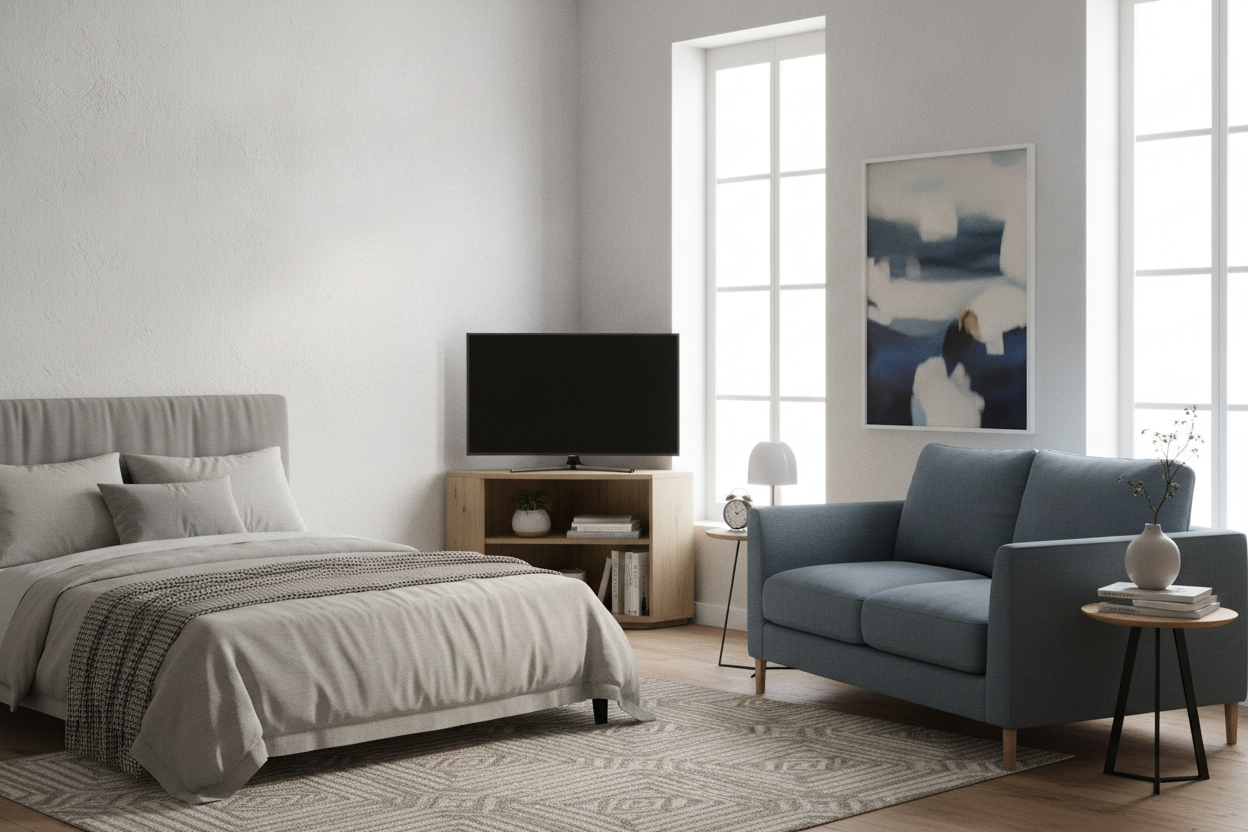
I spent three nights with a tape measure and a roll of blue painter's tape, trying to figure out how to fit a screen into my bedroom without losing the ability to open my closet. My room is a classic old-apartment puzzle: one wall is all window, another is the bed, and the third is a closet door that swings out exactly 28 inches. There was no room for a traditional dresser or console.
After scrolling through hundreds of options to browse standard tv stands, I realized my mistake. I was trying to force a flat piece of furniture into a room that didn't have a flat wall. The solution was a corner tv unit 80cm wide. It’s the specific size that turns a dead corner into a functional media hub without making the room feel like a storage unit.
- 80cm width is the sweet spot for 32-43 inch screens in tight corners.
- An 80cm height is actually better for bedrooms than standard low-slung media consoles.
- Cable management is non-negotiable when your TV is tucked into a corner.
- Always measure your closet door swing before clicking 'buy'.
The 'No Wall Space' Bedroom Dilemma
My bedroom is basically a hallway with a queen-sized bed shoved in it. I tried the 'TV on the dresser' move, but the dresser was too wide and blocked the path to the bathroom. I tried a wall mount, but the studs didn't line up where I needed them, and I didn't want to risk my security deposit over a crumbling lath-and-plaster wall.
When you have zero flat wall space, you have to look at the corners. Most people ignore them or put a dusty floor lamp there. But a corner unit angles the screen toward the bed, utilizing that weird dead zone behind the door swing. It took me way too long to stop looking at 120cm consoles and realize that smaller is actually smarter here.
Why I Specifically Hunted for a Corner TV Unit 80cm Wide
Why 80cm? It’s about 31.5 inches. If you go much wider, the 'wings' of the unit start to poke out into your walking path. I measured my corner and found that an 80cm unit sits deep enough to hold a modern 40-inch TV without the screen edges overhanging the furniture. It’s snug, it’s intentional, and it doesn't look like you're trying to fit a square peg in a round hole.
I once bought a 100cm unit thinking 'more storage is better.' It was a disaster. I spent two weeks stubbing my toe on the corner of the wood every time I went to get socks. Scaling down to a corner tv unit 80cm wide gave me back those precious four inches of floor space, which sounds small but feels like a mile in a tiny apartment.
Going Up: The Hidden Perks of a TV Cabinet 80cm High
Standard living room media units are usually about 45cm to 50cm high. That’s great if you’re sitting on a low sofa, but it’s a nightmare if you’re propped up on pillows in bed. You end up tucking your chin to your chest, which is a one-way ticket to a neck cramp. That is why I specifically looked for a tv cabinet 80cm high.
At 80cm (roughly 31 inches), the screen sits at eye level while you're leaning against a headboard. It also creates enough vertical space for actual storage underneath. I use the lower shelves for my PlayStation and a basket of extra chargers. It keeps the clutter off the floor and puts the screen exactly where it needs to be for a comfortable Sunday morning binge-watch.
Wait, Is a TV Stand 80cm High Too Tall for a Living Room?
Honestly? Maybe. If you have one of those ultra-deep, low-slung sofas, a tv stand 80cm high might feel like you're sitting in the front row of a movie theater. You’ll be looking up slightly. However, if you have a more formal upright sofa or you’re using the TV in a multipurpose room, the extra height is a blessing. Just check your sightlines before committing.
Styling a Narrow Corner Unit So It Doesn't Look Like a Dorm
The biggest risk with small corner furniture is that it can look a bit 'temporary.' To avoid the college-dorm vibe, I opted for a unit with a dark wood finish and solid metal hardware. Cheap laminate with plastic handles will always look cheap. I also spent $15 on a cable management box to hide the rat's nest of power strips behind the unit.
You can also style a display cabinet tv stand by adding one or two 'real' objects. Don't just stack remotes there. I put a small ceramic tray for my watch and a single art book on the middle shelf. It makes the piece feel like a part of the room's decor rather than just a utility stand for the tech.
When You Actually Need to Abandon the Corner Setup
Look, I love my corner unit, but it’s a specific tool for a specific problem. If I ever move into a place with a massive, blank master bedroom wall, I’ll probably want something with more presence. A corner unit can look a bit lonely if it’s not actually tucked into a corner.
In a bigger space, I’d likely swap this out for a wide storage cabinet with drawers. That gives you way more room for linens or clothes while still acting as a media base. But for now, in my current 'impossible' layout, that 80cm corner footprint is the only reason I’m not staring at a blank wall every night.
FAQ
What size TV fits on an 80cm corner unit?
You can comfortably fit up to a 43-inch TV. Most 43-inch screens are about 96cm wide, which sounds too big, but because it's a corner unit, the screen sits slightly forward and the edges don't hit the walls.
Is 80cm too high for a TV stand?
For a bedroom, it's perfect. For a living room with low seating, it might be a bit tall. Measure from the floor to your eye level while seated; that's where the middle of your screen should ideally be.
Do corner units save space?
Absolutely. They use the depth of the corner which is usually wasted, allowing you to keep your walking paths clear. It’s the best way to deal with swinging doors or narrow walkways.

Dejar un comentario
Este sitio está protegido por hCaptcha y se aplican la Política de privacidad de hCaptcha y los Términos del servicio.