










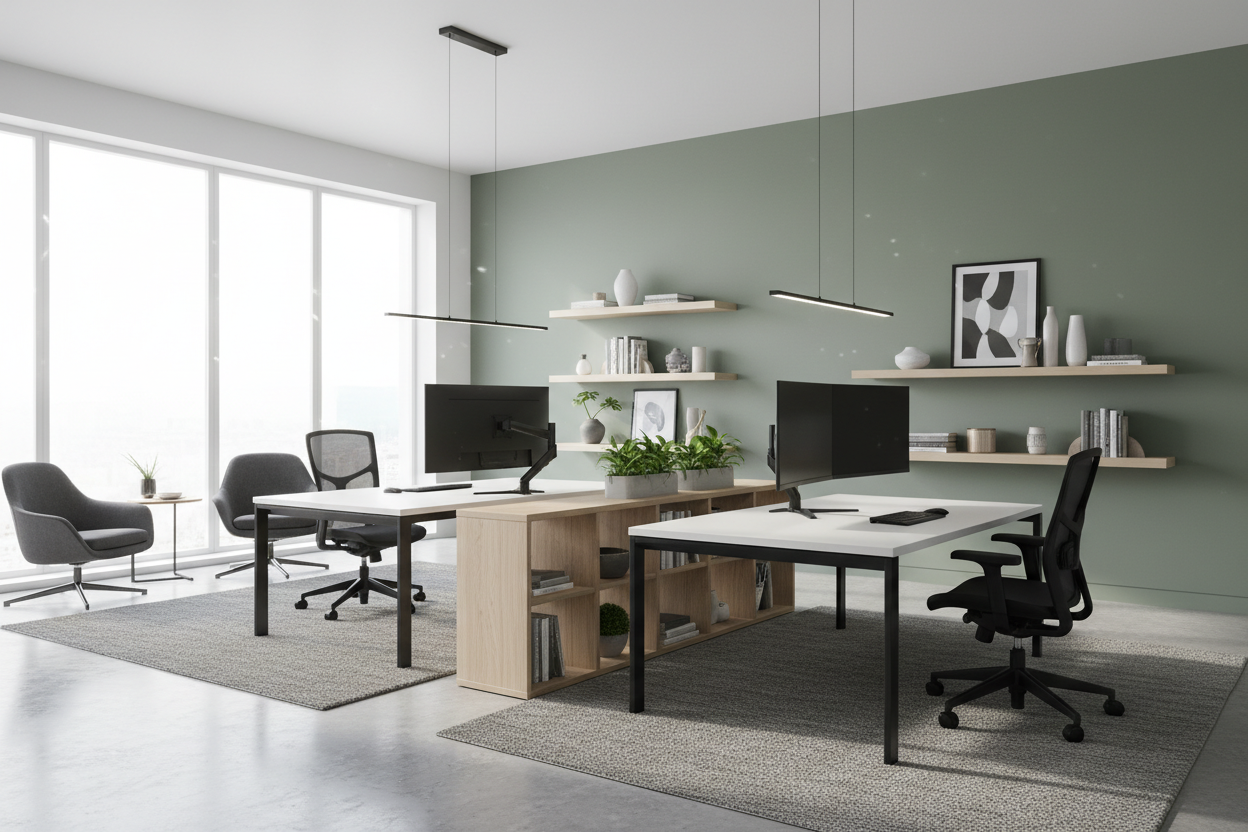
We have all been there: trying to share the dining room table with a partner or roommate, bumping elbows, and silently glaring when their typing gets too loud. What started as a temporary remote work fix quickly turns into a daily frustration. Designing a modern home office for two is the ultimate relationship saver, but getting the layout right requires much more than just shoving a pair of tables into a spare bedroom.
When you introduce a second workstation into a room, the visual weight doubles. Without proper space planning, the room can quickly feel like a cramped corporate call center rather than a comfortable residential study. Today, I am going to walk you through exactly how to arrange a shared workspace that feels balanced, looks cohesive, and actually gives both of you enough room to breathe.
Quick Decision Guide
- Allow at least 36-42 inches of clearance behind each chair so both people can push back and stand up without colliding.
- If your room is long and narrow, a side-by-side layout along the longest wall will maximize your usable floor space.
- Matching desks create visual harmony, but you should always buy separate, highly adjustable ergonomic chairs tailored to each person's body type.
- Floating desks in the center of the room require meticulous cable management—if you cannot hide the cords, anchor the desks to a wall.
Mastering the Shared Layout
Figuring out a home office layout for two desks is the biggest hurdle in shared spaces. The architecture of your room—specifically the placement of windows, doors, and electrical outlets—will largely dictate your best option.
The Side-by-Side Approach
This is the most popular solution for standard rectangular bedrooms. By placing two desks side-by-side against the longest unbroken wall, you open up the rest of the room for a shared lounge chair or a wall of bookshelves. To keep this home office space for two from looking like a library testing center, leave at least 18 inches of negative space between the desks. You can fill this gap with a tall floor plant or a shared filing cabinet to create a natural boundary.
The Face-to-Face Setup
If you have a wider room and want a more collaborative feel, you might wonder how to arrange an office with 2 desks in the center of the space. Having office desks facing each other (a partners' desk arrangement) creates a striking focal point. However, this setup demands identical or highly complementary desks since the backs of the furniture will be exposed. You also need to consider monitor height; if you both use dual 27-inch monitors, you will end up staring at a wall of screens rather than each other.
Making It Work in Tight Quarters
Fitting multiple desks in small office footprints requires strategic compromises. When square footage is at a premium, a T-shaped layout often works best. This involves placing one long desk against the wall and a second desk jutting out from the center, forming a 'T'. It utilizes the corners effectively while giving both users their own distinct zone.
Managing Visual Clutter
In a home office multiple desks mean multiple sets of cords, papers, and coffee mugs. To maintain a modern aesthetic, opt for desks with closed storage or built-in cable trays. A shared workspace quickly feels chaotic if one person is a minimalist and the other is a pile-maker. Establishing a shared storage system—like a central credenza—keeps the individual desk surfaces clean and visually light.
Style & Coordination
Creating an equitable office space for two means finding a style that suits both users without looking mismatched. You do not need to buy identical matching sets. In fact, slightly varied finishes often look more sophisticated. If one person prefers a standing desk with a metal base and the other wants a traditional wood writing desk, tie them together through unifying elements. Use matching desk lamps, identical leather desk pads, or a single large area rug that anchors both workstations.
Lessons from My Own Projects
A few years ago, I designed a stunning mid-century shared workspace for a couple in a Toronto condo. We went with a beautiful floating arrangement with the desks facing each other. It looked incredible in the initial photos. But I learned a hard lesson about power access: because the floor was solid concrete, we could not run floor outlets.
We ended up with a thick, ugly rubber cord cover running across the vintage Persian rug, which completely disrupted the sleek aesthetic. Furthermore, whenever one partner took a heavy typing fit, the shared central table vibrated, driving the other person crazy. Now, I always map out the electrical outlets before committing to a floating layout, and I strongly recommend slightly separating the desks so movement doesn't transfer between them.
Frequently Asked Questions
What is the minimum room size for a two-person office?
Ideally, you need a room that is at least 10x10 feet to comfortably fit two desks, two chairs, and allow for proper circulation. Anything smaller, and you will need to look into custom built-in countertops rather than freestanding furniture.
How do we handle video calls in a shared office?
Acoustics are tricky in shared spaces. Position the desks so that neither person is in the background of the other's webcam. Adding soft materials like heavy drapery, upholstered acoustic panels, and a thick rug will help absorb sound and reduce echo during simultaneous calls.
Are L-shaped desks good for shared spaces?
L-shaped desks are excellent for utilizing corners, but they take up a massive amount of floor space. In a shared room, placing two L-shaped desks in opposite corners works well, but it often leaves the center of the room feeling awkwardly empty. They are best reserved for larger rooms.

Dejar un comentario
Este sitio está protegido por hCaptcha y se aplican la Política de privacidad de hCaptcha y los Términos del servicio.