










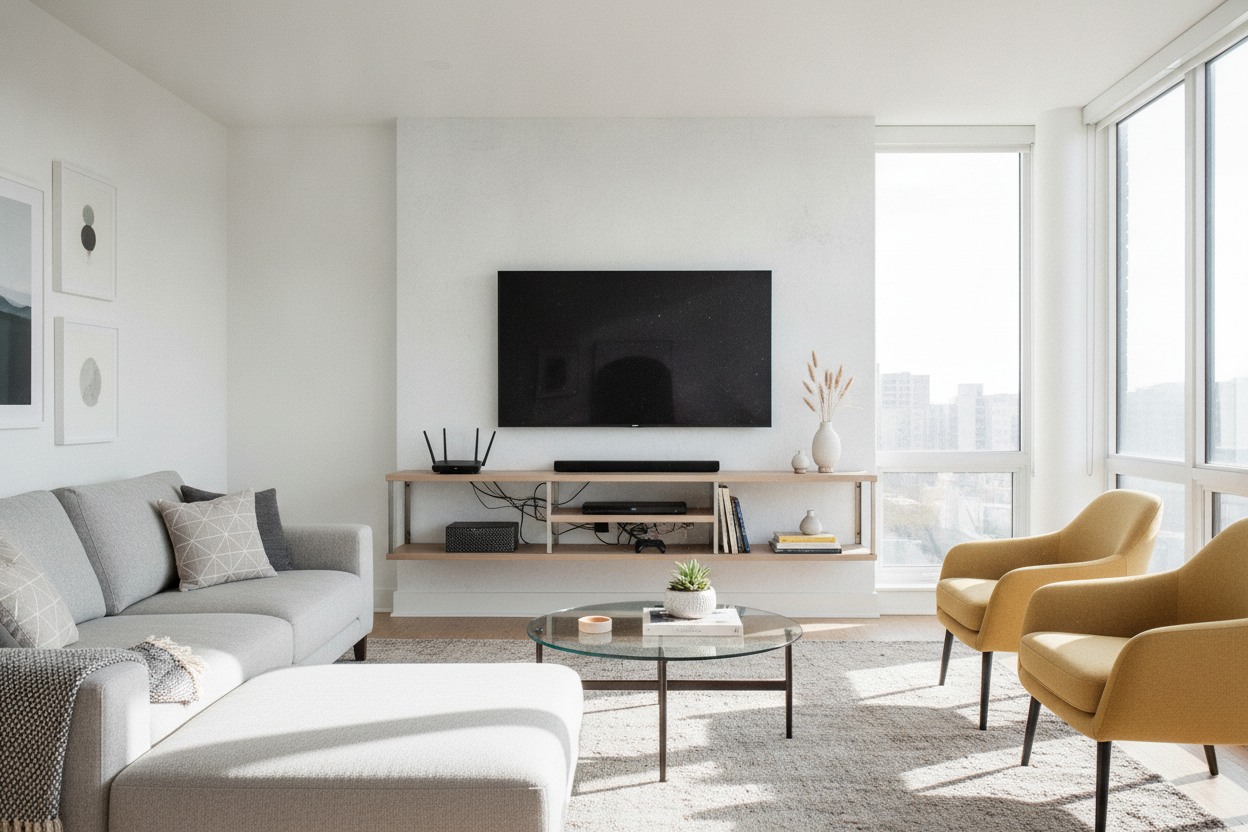
I remember the day I finally got my 65-inch OLED on the wall. I stepped back, admired the clean lines, and then realized my Apple TV and router were sitting on a stack of books on the floor. It looked like a tech support center exploded in my living room. That is when I realized a tv accessory shelf isn't just a 'nice to have'—it is the only way to actually finish the job without living in a cable-induced nightmare.
- Wall-mounted TVs require a dedicated home for peripherals to avoid 'cable sag.'
- Look for tempered glass or heavy-duty steel with built-in cable management.
- Depth matters: 10-12 inches is the sweet spot for most streaming boxes and routers.
- Style with greenery or books to mask the 'Best Buy' aesthetic.
The Wall-Mounted TV's Biggest Flaw
The dream of a wall-mounted TV is all about minimalism. You want that sleek, floating look that makes your living room feel like a high-end gallery. But the reality hits the second you plug in your first device. Suddenly, your Apple TV, router, and Nintendo Switch are awkwardly stranded on the floor or, worse, dangling by their HDMI cords like sad, electronic fruit.
I spent three months trying to hide my router behind the screen, only for my Wi-Fi signal to tank and the device to overheat. It turns out, electronics need air and a flat surface. Without a dedicated tv equipment shelf, you are just trading floor clutter for wall clutter. It is the universal frustration of modern decor: we want the tech, but we don't want to see the plastic boxes it comes in.
What Exactly Makes a Shelf Just for Accessories?
You might think any old floating ledge from a big-box store will work, but I have the cracked drywall to prove otherwise. A specialized tv component shelf wall mount is built differently. These aren't just decorative pieces of pine; they are designed with weight distribution and cable routing in mind. A standard ledge usually lacks the depth for a modern router and rarely has that crucial 1-inch gap at the back for cords to pass through.
When shopping for shelves for tv components, look for tempered glass or powder-coated steel. These materials handle the heat from your devices way better than cheap MDF. Do You Really Need an On Wall TV Shelf for a Mounted Screen? If you are only using built-in smart apps, maybe not. But the moment you add a soundbar or a gaming console, a dedicated tv equipment shelves setup becomes non-negotiable for keeping your sanity and your hardware safe.
How to Style Your Tech So It Doesn't Look Like a Best Buy
The biggest mistake people make with wall mounted shelves for tv accessories is treating them like a utility closet. You don't have to just line up black boxes in a row. I like to mount my tv wall mount component shelves asymmetrically—shifted about four inches to the left or right of the screen's center. It feels more like a design choice and less like a bracket.
To hide the 'ugly' tech, I use the 'organic mask' trick. Place a small, trailing plant like a Pothos on one end of the shelf. The leaves naturally drape over the blinking LEDs of your router without blocking the signal or the airflow. Mix in a couple of horizontally stacked coffee table books next to your streaming box. It breaks up the hard plastic lines and makes the shelf for tv components feel like part of your actual decor.
When a Tiny Ledge Isn't Enough
I am all for the minimalist life, but I have to be honest: if you own a PlayStation 5 or a beefy AV receiver, a floating glass ledge is going to fail you. Those consoles are massive, heavy, and put out an incredible amount of heat. Trying to cram a PS5 onto a slim wall mount shelf for tv components is a recipe for a very expensive loud thud in the middle of the night.
If your gear list includes a turntable, a massive gaming rig, or a collection of physical media, it is time to abandon the floating dream. In those cases, I always recommend looking at full-sized Tv Stands. You can still mount the TV on the wall above it, but you'll have the structural integrity and ventilated cabinets needed for heavy-duty hardware. Don't force a minimalist solution onto a maximalist hobby.
My Favorite Trick for Hiding the Wires
Even with the best wall mounted shelves for tv components, you still have the 'umbilical cord' problem—those wires running from the shelf to the TV. My go-to renter-friendly fix is paintable cord raceways. They are essentially plastic channels with an adhesive back. I stick them to the wall, snap the cables inside, and paint the plastic the exact color of my living room wall (Sherwin Williams Iron Ore, in my case).
Once the raceway matches the wall, it practically disappears. I use small zip ties to bundle the excess cord length behind the tv accessory shelves so nothing loops down. It takes twenty minutes and costs less than a takeout pizza, but it makes the whole setup look like a professional custom install. It's the difference between a DIY project and a finished room.
FAQ
Can I mount a shelf on drywall without studs?
I wouldn't risk it for electronics. Use a stud finder and secure at least one side to wood. If you must use anchors, get the heavy-duty toggle bolts, not the cheap plastic ones that come in the box.
How far below the TV should the shelf be?
Four to six inches is the sweet spot. It is close enough to hide most of the wiring but far enough that it doesn't look cramped or interfere with your TV's bottom sensors.
Will a glass shelf hold a soundbar?
Most soundbars are surprisingly heavy. Check the weight rating on your tv accessory shelf; if your soundbar is over 10 pounds, look for a dedicated soundbar bracket that mounts directly to the TV VESA plate instead.


Dejar un comentario
Este sitio está protegido por hCaptcha y se aplican la Política de privacidad de hCaptcha y los Términos del servicio.