










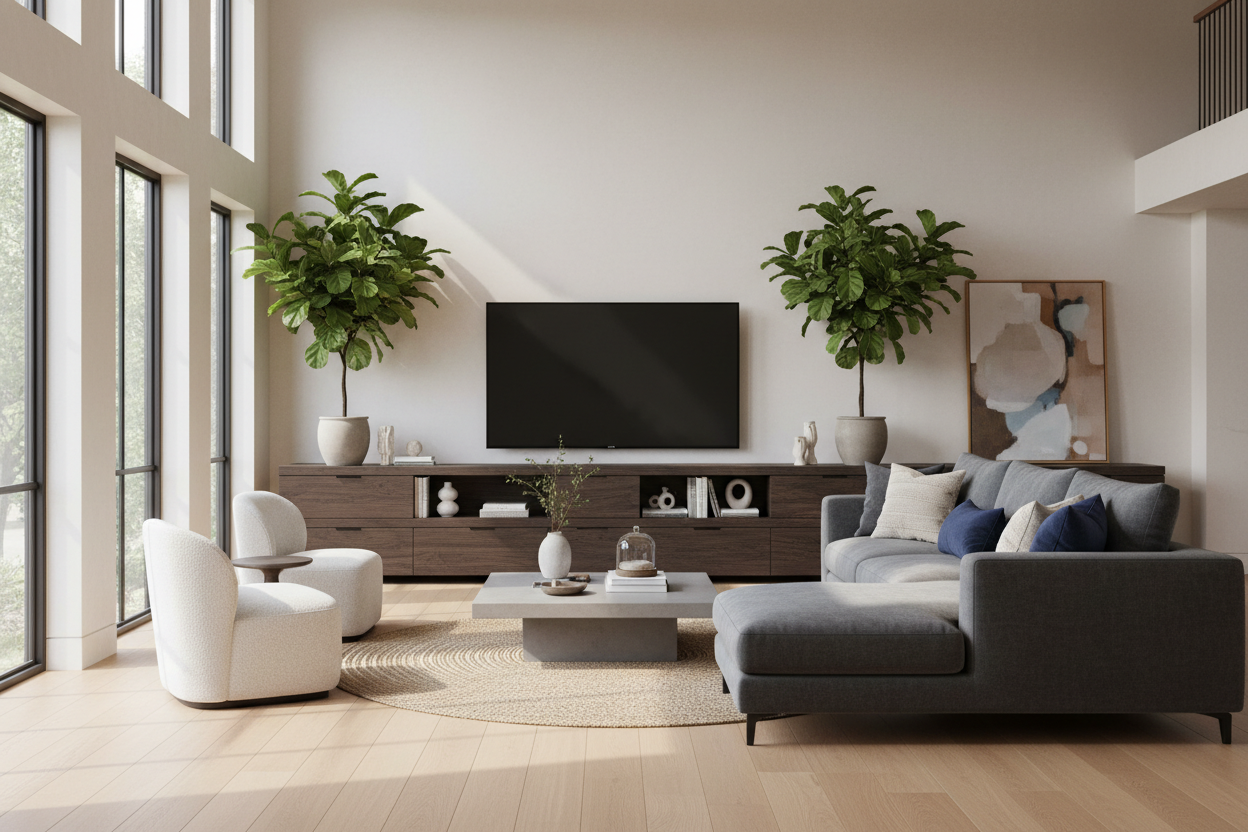
I remember the day my 85-inch screen arrived. I felt like a king until I sat it on my old 60-inch console and realized my living room suddenly looked like a college dorm room. The screen hung off the edges, the cables were a rat's nest, and the whole setup looked like it might tip over if someone sneezed too hard. If you want your space to feel intentional, you need the largest tv stand your wall can actually handle.
- Follow the 10-inch rule: Your stand should be at least 10 inches wider than your TV on each side.
- Avoid 'floating' screens by grounding them with a console that has significant visual weight.
- Prioritize closed storage to hide the inevitable clutter of gaming consoles and routers.
- Measure your wall twice—a stand that spans nearly wall-to-wall creates a built-in look for a fraction of the price.
The Best Buy Showroom Effect (And Why We Hate Big Screens)
We’ve all seen it: a massive 75-inch or 85-inch screen perched precariously on a tiny cabinet. It creates what I call the Best Buy Showroom Effect. Instead of a cozy living room, you have a tech-heavy void that sucks the soul out of your decor. When you put a large tv on stand setups that are too narrow, the TV becomes a looming shadow rather than a part of the room's design.
The problem is scale. Modern flatscreens are so thin that they need a substantial base to anchor them. Without huge tv stands to provide a horizontal counter-balance, the TV just looks like a giant black rectangle stuck to a wall. I've staged dozens of homes where simply swapping a 60-inch unit for an 80-inch one made the entire room feel twice as expensive.
The Golden Ratio for a Large TV and Stand
Designers live by the 'Golden Ratio' for a reason. For a large tv and stand combo to look 'right,' the furniture needs to be significantly wider than the screen. My personal rule? Aim for at least 10 to 15 inches of breathing room on either side of the TV. If your 85-inch TV is roughly 74 inches wide, you should be looking at consoles in the 94-inch to 100-inch range.
If your screen is already creeping toward the edges of your current furniture, it is time to get a media cabinet for tv setups that actually fit. This extra width doesn't just look better; it allows the eye to rest on something other than the glass. It turns the TV into a component of a larger vignette rather than the sole inhabitant of the wall.
Why Huge TV Stands Prevent the 'Top-Heavy' Look
There is nothing worse than the anxiety of a top-heavy room. When you have a tv unit big enough to support a massive screen, it lowers the visual center of gravity. A wide, low-profile large entertainment center creates a solid foundation that makes the room feel grounded and stable. I’ve seen cheap, narrow stands literally bow under the weight of a premium 85-inch Sony or Samsung because they weren't built for that kind of distribution.
I always tell clients to look for a large entertainment center that uses solid materials. If you’re putting $2,000 worth of glass on a $150 particle board stand that’s only 50 inches wide, you’re asking for trouble. A wider unit distributes that weight and provides the structural integrity needed to keep your screen level and your floor scratch-free.
How to Style a TV Console Large Enough for Your Wall
The biggest fear people have with a tv console large enough for an 85-inch TV is that it will look like an empty runway. It won't. That extra surface area is a gift. Use it to layer in some personality so the TV isn't the only thing people see. I like to place a tall, sculptural lamp on one end and a cluster of matte ceramic vases or some heavy coffee table books on the other.
Trailing plants like a Pothos or Philodendron are great for softening the hard edges of a tv unit large enough to fill a wall. To keep things clean, I highly recommend a large tv cabinet spacious storage option. It lets you tuck away the unsightly stuff—like that blinking router and the tangled HDMI cables—leaving the top surface free for things that actually look good.
Where to Actually Find Large TV Stands for Sale
Finding large tv stands for sale that aren't just two smaller units pushed together can be a challenge. You want to avoid modular pieces that leave a visible gap in the middle; it looks unfinished and cheap. Look for single-span units or high-quality sets designed to bolt together seamlessly. When you’re shopping, check the 'Max TV Size' spec, but then ignore it and look at the actual width in inches.
If you are ready to stop the 'floating screen' madness, start by browsing a curated collection of tv stands that prioritize width and scale. Don't be afraid to go big. In ten years of staging homes, I have never once had a client tell me they wished they had bought a smaller media console.
My Personal Lesson in Scale
I once tried to save $300 by keeping a mid-century sideboard as my TV stand for a new 75-inch screen. The sideboard was 60 inches wide. The TV was 66 inches wide. It looked ridiculous—like a grown man wearing a toddler's t-shirt. I eventually bit the bullet and bought a 90-inch white oak console. The difference was night and day. The room finally felt 'finished' because the furniture finally matched the scale of the technology.
FAQ
How much wider should a stand be than the TV?
Ideally, your stand should be at least 20% wider than your television. For an 85-inch TV, look for a stand that is at least 90 to 100 inches wide to maintain proper visual balance.
Can a TV stand be too long?
Almost never. As long as you have at least 6 inches of clearance from the corners of your room or nearby doorways, a wall-to-wall console usually looks more high-end and custom than a small, isolated piece.
Should I wall-mount my TV if I have a large stand?
Yes. Even if you have a massive stand, mounting the TV about 6 inches above the surface allows you to use the console for decor without blocking the screen. It also keeps the 'large tv on stand' look from feeling cluttered.

Dejar un comentario
Este sitio está protegido por hCaptcha y se aplican la Política de privacidad de hCaptcha y los Términos del servicio.