










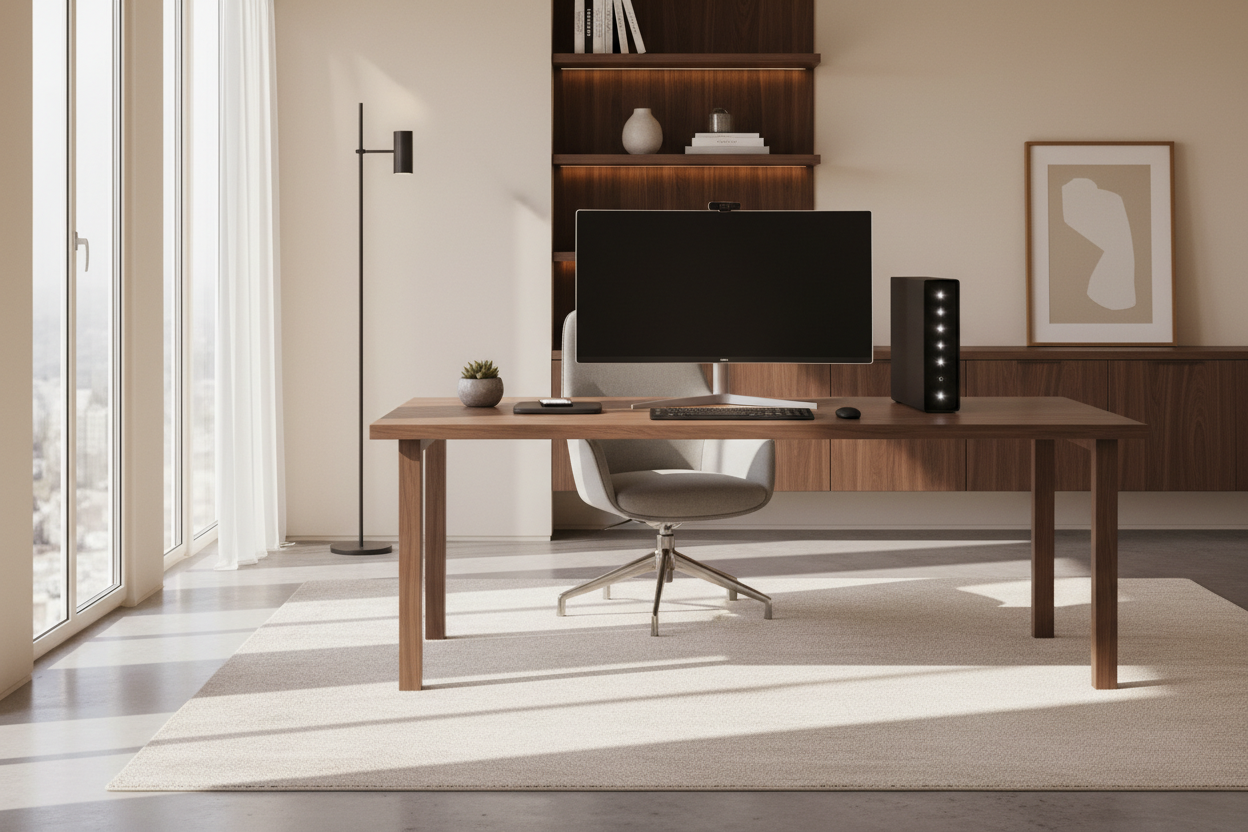
Nothing disrupts the flow of a beautifully curated study quite like a bulky, humming black box dominated by a tangle of wires. As an interior designer, I see this friction constantly: clients invest in mahogany desks and ergonomic Herman Miller chairs, only to clutter the surface with industrial-looking hardware. Finding the best desktop computer for working from home isn't just about processing power or RAM; it is about finding a machine that respects the visual balance of your room while delivering the performance you need.
Your technology should act as a seamless extension of your workspace, not an eyesore. Whether you are drafting architectural plans or managing spreadsheets, the silhouette, finish, and footprint of your computer matter just as much as the processor inside.
Quick Decision Guide: What Matters for Home Office Design
- Form Factor & Footprint: Decide between an All-in-One (AIO) for a minimalist look or a Compact Tower for upgradeability. The goal is to minimize the desk surface area used.
- Cable Management Potential: Look for systems with built-in cable routing or wireless peripherals to maintain a clean visual line.
- Acoustics: A loud fan can ruin the ambient tranquility of a home office. Prioritize silent cooling systems or solid-state drives (SSDs).
- Screen Ergonomics: Ensure the monitor size correlates with your desk depth (viewing distance) to prevent eye strain and visual overcrowding.
- Material Finish: Choose matte finishes to reduce glare in sun-drenched rooms or metallic accents to match hardware (drawer pulls, lamps).
Choosing the Right Form Factor: All-in-One vs. Tower
When scouting the best desktop for work from home, the silhouette is your first design decision. For clients seeking a modern, clutter-free aesthetic, All-in-One (AIO) computers are often the superior choice. These machines integrate the internal components directly into the monitor housing. From a design perspective, this reduces visual weight and eliminates the need for a separate tower on the floor or desk. Ideally, you want a unit with a single power cord, creating a floating effect that keeps your workspace feeling open and airy.
However, if raw power is non-negotiable—perhaps for rendering or heavy data processing—the best home office pc might be a tower. In this case, look for small form-factor (SFF) cases or mini PCs. These can be easily mounted under the desk or tucked inside a ventilated cabinet, preserving the integrity of your design scheme.
The Ergonomics of Screen Real Estate
Size is not just a technical specification; it is a spatial consideration. The best desktops for home office setups must be proportional to your furniture. A massive 34-inch curved monitor on a shallow, 24-inch deep writing desk will feel oppressive and cause eye strain. Conversely, a small 21-inch screen on a large executive desk looks lost and breaks the visual hierarchy.
Balancing Dual Monitors
Many professionals believe the best home office computer setup requires dual monitors. While functional, two screens can create a "wall" that blocks light and sightlines. If you require expansive digital space, I often recommend a single ultra-wide monitor. This offers a cleaner, more continuous curve that looks intentional and architectural rather than cluttered.
Materiality and Visual Integration
We often discuss wood grain and fabric textures, but the casing of your computer is also a material choice. The best home office desktop should complement your existing palette. Brushed aluminum pairs beautifully with industrial or mid-century modern styles, echoing chrome lamp bases or chair legs. Matte black finishes tend to recede visually, making them a safe choice for darker, moodier office designs.
Avoid high-gloss plastic casings if your office has significant natural light. The reflections can be distracting and the material often looks inexpensive against natural wood or stone desk surfaces. The best pc for home office use is one that feels like a premium appliance, not a toy.
Cable Management: The Invisible Art
The best pcs for home office environments are the ones you don't see—or at least, the wires you don't see. Wireless connectivity is paramount. Prioritize desktops that include high-quality Bluetooth peripherals (keyboard and mouse) out of the box. If you must use a tower, ensure it has rear-facing ports that allow cables to be bundled and routed down a desk leg immediately. Visual chaos disrupts mental clarity; a wireless setup is the quickest way to achieve a "luxury" look.
My Personal Take on the Best Desktop Computer for Working from Home
I learned a hard lesson about finish and lighting in my own home office renovation last year. I purchased a high-end, glass-backed All-in-One that looked stunning in the showroom. It was technically the best pc for work from home on paper. However, my desk faces a south-facing window. The glossy screen was essentially a mirror until sunset.
Beyond the glare, the "piano black" stand became a magnet for dust and fingerprints. I found myself wiping it down three times a day just to maintain that crisp, professional look. I eventually swapped it for a matte-finish mini-PC mounted underneath my solid walnut desk. Now, the only thing on my desk is a monitor on a beautiful brass arm and a wireless keyboard. The computer is invisible, the fan is silent, and the focus is entirely on the work. It taught me that the best work from home desktop computer is the one that disappears when you don't need it.
Conclusion
Selecting the best home computer setup is a balancing act between technical requirements and interior harmony. Don't let the specs sheet dictate the feel of your room. By prioritizing form factor, cable management, and material finish, you can find a machine that not only handles your workload but elevates the sophistication of your home office.
Frequently Asked Questions
1. How much desk depth do I need for a 27-inch desktop?
For a standard 27-inch monitor, aiming for a desk depth of at least 30 inches (approx. 75cm) is ideal for ergonomic comfort. This prevents the screen from dominating your field of vision and leaves ample room for a keyboard and paperwork.
2. Is an All-in-One better than a Tower for a small home office?
Generally, yes. An All-in-One is the best home office pc choice for tight spaces because it eliminates the floor footprint of a tower and reduces cable clutter, making the room feel larger and more organized.
3. How do I hide the computer tower if I don't want to see it?
You can place the tower inside a desk cabinet, provided there is adequate ventilation or an installed fan to prevent overheating. Alternatively, use an under-desk CPU mount to suspend the unit, keeping it off the floor and out of direct sightlines.


Leave a comment
This site is protected by hCaptcha and the hCaptcha Privacy Policy and Terms of Service apply.