










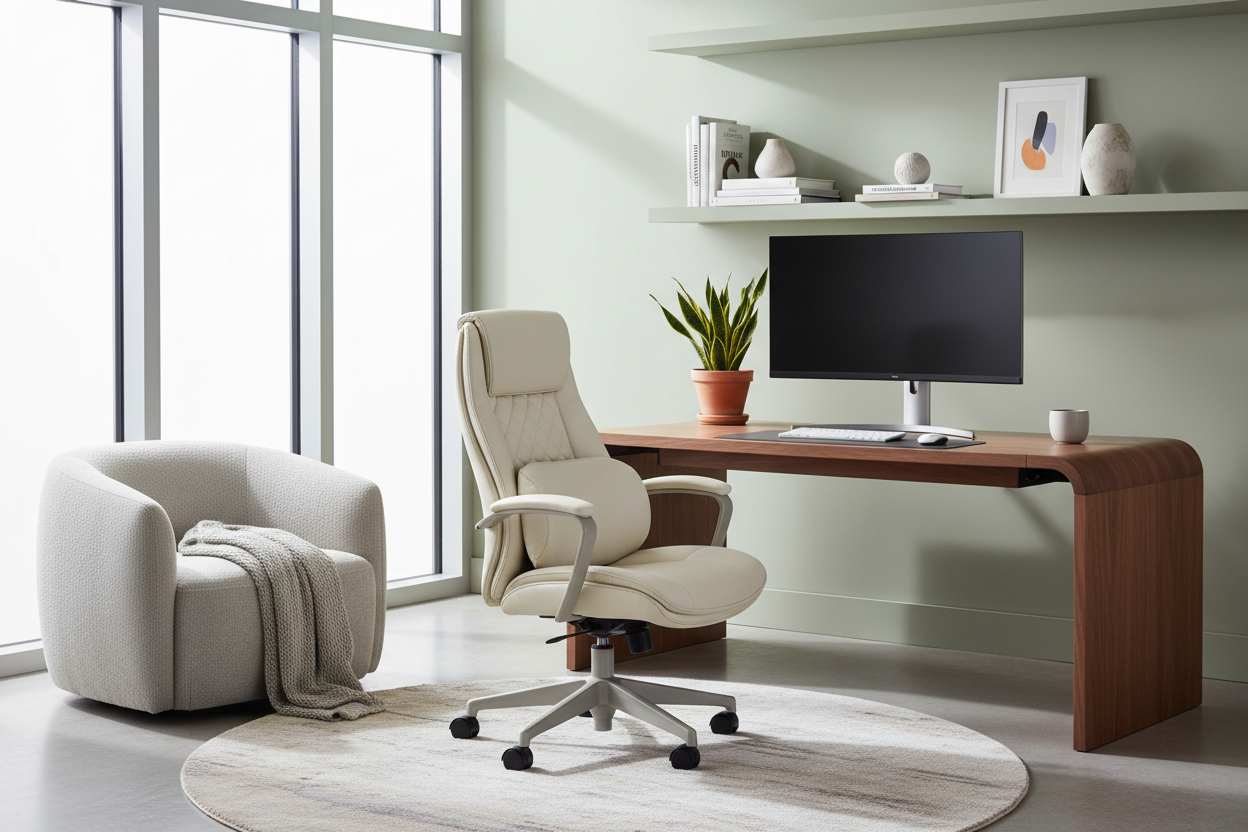
We have all experienced the midday fatigue that stems not from the workload, but from the environment itself. A stiff neck, eye strain from poor lighting, or a workspace that feels sterile rather than inviting. As a designer, I see clients prioritize aesthetics over function constantly, only to realize that productivity plummets when physical ease is ignored. True office comfort is not just about buying a soft chair; it is about curating an ecosystem where ergonomics and design principles coexist seamlessly.
Core Components of Workspace Wellness
Before investing in new furniture, evaluate your space against these foundational pillars. These are the non-negotiables for achieving a professional yet comfortable home office.
- Ergonomic Alignment: The relationship between your eyes, elbows, and knees relative to your desk and chair height.
- Tactile Materiality: Choosing surfaces (woods, leathers, textiles) that feel good to the touch and regulate temperature.
- Lighting Layers: Balancing ambient light with focused task lighting to reduce ocular fatigue.
- Acoustic Control: Using soft furnishings to dampen echo and create a sense of privacy.
- Visual Flow: Ensuring the layout allows for easy movement and reduces visual clutter.
The Ergonomic Baseline: Beyond the Chair
While the chair is the throne of the office, the desk is its foundation. A common misconception is that a comfy home office requires overstuffed furniture. In reality, comfort comes from support and adjustability. When selecting a desk, consider the depth. A narrow console table might look sleek, but if you cannot extend your legs or position your monitor at an arm's length, you are compromising your posture.
Material Selection and Tactile warmth
The materials you interact with daily significantly impact your perception of comfort. Solid wood or high-quality veneers offer a warmth that glass and metal simply cannot replicate. Glass desks, while visually lightweight, are often cold to the touch, which can be distracting during long work sessions. To create a truly comfy home office, introduce natural textures. A leather desk pad, for instance, not only protects the wood but provides a soft landing for your wrists and improves the acoustics of your typing.
Lighting: The Invisible Comfort
If you are wondering how to make home office more comfortable without buying new furniture, look at your lighting. Overhead 'can' lighting often casts harsh shadows that strain the eyes. The goal is to create a layered scheme. Start with ambient light (general illumination), add a task lamp with a warm temperature (2700K-3000K) for focused work, and consider accent lighting to highlight shelves or art. This hierarchy of light reduces contrast ratios, which is the primary cause of headaches in home workspaces.
Spatial Planning and Visual Balance
A cluttered mind often reflects a cluttered space. Visual balance is a subtle but powerful aspect of office comforts. Ensure your layout allows for a 'breathing room.' If your desk faces a wall, mount a piece of art or a floating shelf above it to give your eyes a resting point. If space permits, 'floating' the desk in the center of the room commands authority and allows you to see the door, tapping into a primal sense of security and ease.
My Personal Take on Office Comfort
Lessons from the "Glass Desk" Era
Early in my career, I designed a minimalist office for a client featuring a stunning, architectural glass desk. It photographed beautifully. However, three weeks later, the client called me. The issue wasn't the look; it was the temperature. She told me, "Every time I rest my forearms to type, the glass sucks the heat right out of me. It’s distracting."
I realized then that thermal comfort is a massive, overlooked factor. We ended up having to commission a custom felt wool blotter that covered nearly half the desk just to make it usable. Since then, I always check the thermal conductivity of materials. I also check "fingerprint fatigue." Matte finishes are forgiving, but high-gloss lacquers or chrome require constant polishing. True luxury is low maintenance; you shouldn't have to clean your furniture every time you touch it.
Conclusion
Designing for comfort is an investment in your own longevity and output. By blending ergonomic science with the warmth of residential design, you create a space that pulls you in rather than pushes you away. Whether it is the tactile grain of a walnut desk or the perfect lumbar support of a task chair, these details compound to elevate your entire workday.
Frequently Asked Questions
Is an ergonomic chair worth the investment for a casual home office?
Absolutely. Even if you only sit for two hours a day, poor support can lead to cumulative strain. Look for chairs with adjustable lumbar support and seat depth to ensure your spine remains neutral, regardless of the price point.
How can I make a small office feel less claustrophobic?
Focus on verticality and sightlines. Use tall shelving to draw the eye up and keep the floor clear. Choose furniture with exposed legs rather than solid bases; seeing the floor underneath furniture tricks the brain into perceiving more square footage.
What is the best color temperature for office lighting?
Aim for 3000K to 4000K for your task lighting. This range is crisp enough to keep you alert and renders colors accurately, but isn't as harsh and sterile as the 5000K+ daylight bulbs often found in commercial office buildings.

Leave a comment
This site is protected by hCaptcha and the hCaptcha Privacy Policy and Terms of Service apply.