










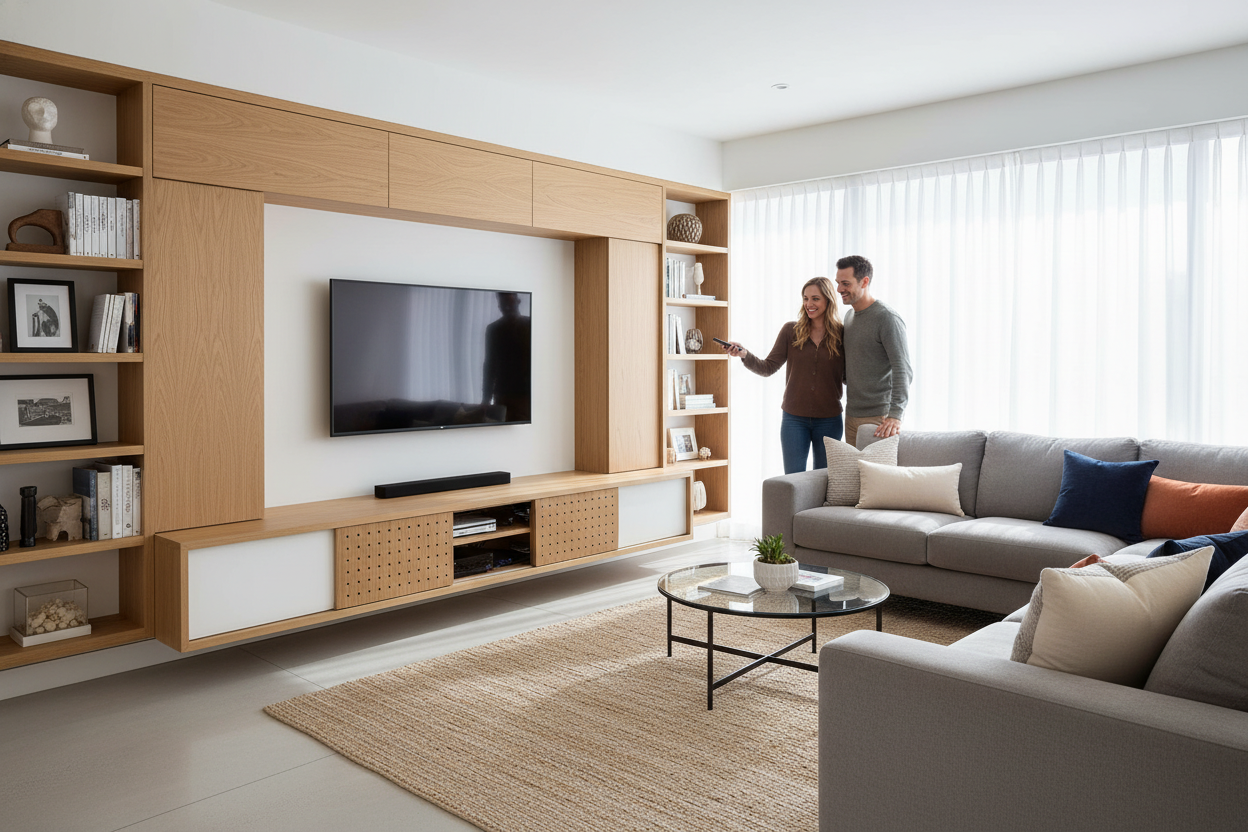
I love my partner, but I absolutely loathe his taste in tech aesthetics. For three years, our living room looked less like a home and more like a backroom at a suburban Best Buy. Between the glowing neon lights of the gaming PC and the Medusa-like tangle of black HDMI cords, my carefully curated gallery wall didn't stand a chance. I finally hit my breaking point when I tripped over a stray ethernet cable while carrying a glass of red wine. That was the day I decided a wall mounted tv cabinet was the only way to save our relationship and my rug.
- Floating units make small rooms feel significantly larger by exposing more floor.
- Cable management is 100% easier when the wires are tucked directly into the wall.
- Consoles need air; never buy a cabinet without ventilation holes or a mesh front.
- Mounting height is the biggest mistake people make—aim for eye level, not neck-strain level.
The 'Best Buy Showroom' Problem
Living with a tech enthusiast is a constant battle between function and form. He wanted the fastest router and every gaming console known to man; I wanted a room that didn't look like a server farm. The visual noise of three different black boxes and a router with eight antennas was driving me insane. It wasn't just the devices themselves, but the web of dust-covered cords that seemed to multiply every time I looked away.
The problem is that most tech is designed to be seen, but it is rarely designed to be pretty. When you have a 65-inch screen hanging on the wall, anything sitting beneath it becomes the focal point. If that focal point is a mess of plastic and wires, your whole design scheme collapses. We needed a way to keep the gear accessible but invisible.
Why Traditional Floor Consoles Weren't Cutting It
I used to think a heavy wooden credenza was the answer. I was wrong. Traditional floor units often have those tiny, two-inch cord holes that are impossible to thread a modern plug through. Plus, they create a dark, narrow cavern between the back of the furniture and the wall where dust bunnies go to die. Every time I looked at our setup from the side, I could see the colorful spaghetti of wires dangling down.
I realized the floor stand was actually the root of the visual clutter. It felt heavy and anchored the mess to the ground. I Swapped My TV Stand for a Modern Wall Cabinet for Living Room Storage because I realized the floor stand was just a pedestal for clutter. By lifting the storage off the ground, the room felt like it could breathe again. It stopped being a 'TV area' and started feeling like a living room.
The Magic of a Wall Mounted TV Cabinet
Installing a mounted tv cabinet isn't just about aesthetics; it's about reclaiming your sanity. We spent a Saturday afternoon routing cables through the drywall using a simple brush-plate kit. Every single wire—power, HDMI, internet—disappears behind the TV and pops out inside the cabinet. No more dangling black lines ruining the paint job.
The real win was the storage capacity. If you're dealing with multiple systems, you need a large tv cabinet spacious storage cable management system that can actually handle the bulk. I chose a unit with deep enough shelves to fit a PS5 horizontally, which is a beast of a machine. Once the doors are shut, the tech disappears. The only hint that a gaming marathon is happening is the faint hum of a cooling fan.
Styling Wall Mounted Cabinets Under TV Screens
The top of wall mounted cabinets under tv setups shouldn't be left bare. That is how you end up with the 'floating tech box' look. I treat the top surface like a floating shelf. A few heavy art books, a ceramic vase with some dried eucalyptus, and maybe a small tray for remotes makes it look like a piece of furniture rather than a utility box.
I am a big fan of using a tv cabinet table modern with storage because it provides a wide, clean surface for decor. I kept my styling asymmetrical—taller items on one side to balance out the TV's visual weight. Just make sure you aren't blocking the bottom of the screen or the IR sensor if your TV isn't mounted high enough. It’s about making the tech look like an afterthought to the decor.
What to Look For If You Have Lots of Devices
Don't just buy the first pretty floating box you see on Instagram. If you have a receiver, a PlayStation, and a router, they generate serious heat. Heat kills electronics. Look for units with ventilated back panels or even slatted doors that allow for airflow. I once bought a cheap MDF unit with no holes and my Xbox nearly melted; I ended up having to use a hole saw to DIY some ventilation myself.
Also, check the weight rating. A floating unit is only as strong as the studs it's screwed into. Use a stud finder and do not rely on drywall anchors unless you want your expensive tech crashing to the floor in the middle of the night. Aim for a unit that uses a French cleat system—it is much easier to level and far more secure for heavy gear.
Don't Forget About Remote Signals and Soundbars
If your cabinet has solid wooden doors, your remote signals might not reach your devices. You will either need an IR repeater kit or a cabinet with mesh or glass fronts. Also, measure your soundbar before you mount anything. You need enough clearance between the top of the cabinet and the bottom of the TV so the soundbar doesn't overlap the screen. I left about six inches of breathing room, and it looks much more intentional.
FAQ
How high should I mount my TV cabinet?
Most people mount them too high. Aim for 8 to 12 inches off the floor. This keeps the TV at a comfortable viewing height and leaves enough room to vacuum underneath easily.
Can I hide my router inside the cabinet?
Yes, but it might slightly reduce your Wi-Fi range if the cabinet is thick wood. If you have a mesh system, it usually isn't an issue. Just avoid metal cabinets if you want a strong signal.
Will a floating cabinet hold a heavy TV?
Usually, the TV is mounted to the wall separately, and the cabinet just holds the accessories. If you plan to sit the TV on the floating cabinet, check the weight limit carefully—most are rated for 50-75 lbs when properly installed into studs.

Leave a comment
This site is protected by hCaptcha and the hCaptcha Privacy Policy and Terms of Service apply.