










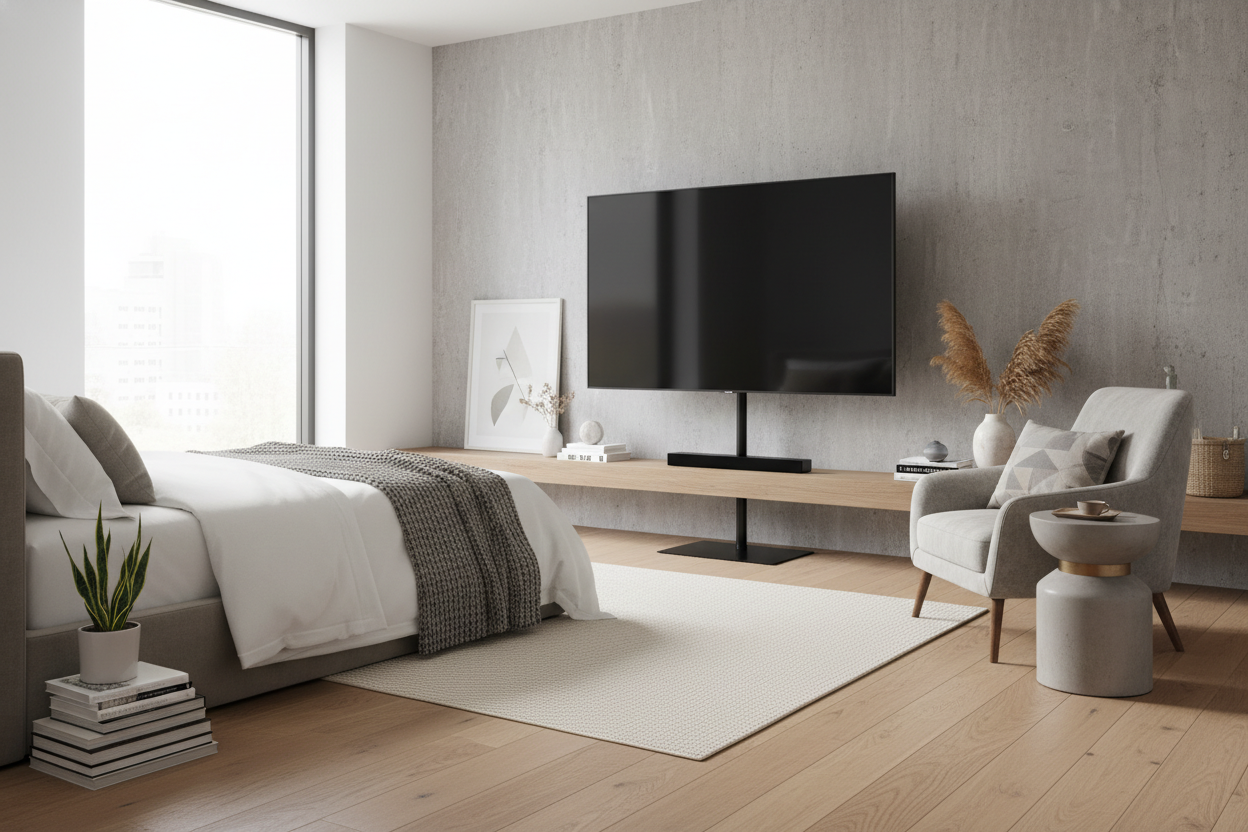
I spent last Tuesday night shimmying sideways between my mattress and my dresser like a bank robber navigating a laser field. My shins were purple, my patience was gone, and I still didn't have a place to watch Netflix. I needed the thinnest tv stand known to man, or I was going to have to start sleeping in the living room.
Finding a way to mount a massive screen in a room that barely fits a Queen bed is a specific kind of spatial puzzle. After returning three 'compact' units that were still too chunky, I finally cracked the code on how to keep a room walkable without sacrificing screen real estate.
- Standard media consoles are 16-18 inches deep; you need under 10 for a tight walkway.
- A slim tv stand with mount is the best 'renter-friendly' alternative to drilling into walls.
- Wall anchors are mandatory for any stand with a depth of less than 8 inches.
- Cable management is harder on thin stands, so plan for cord sleeves.
The 'Foot of the Bed' Spatial Nightmare
My bedroom layout is a classic 'old city' disaster. I have exactly eighteen inches between the foot of my mattress and the wall. In the furniture world, that’s basically a hallway, not a living space. Most designers would tell you to just get a tablet and call it a day, but I wanted a real cinema experience for my late-night rewatches.
The problem is that a collection of standard TV stands usually starts at 16 inches deep. If I put one of those in my room, I’d have two inches of clearance. Unless I planned on parkouring over my bed every time I needed to get to the closet, I needed a true slim tv stand for bedroom use. I started looking for pieces that prioritized a vertical footprint over a horizontal one, which is surprisingly hard to find when you're filtering through big-box retail sites.
What Actually Qualifies as a 'Micro-Depth' Console?
When you start searching for the slimmest tv stand on the internet, you’ll realize 'slim' is a relative term. Some brands call a 14-inch unit 'ultra slim,' which is a flat-out lie. In my world, an ultra slim tv stand has to be under 10 inches deep. Anything more than that and you're still bumping your knees in the dark.
I eventually found that the sweet spot for a tv stand slim enough for my needs was around 6 to 8 inches. It sounds impossible, but it exists. However, you have to accept some aesthetic compromises. You aren't getting deep drawers for your DVD collection or room for a bulky receiver. It makes no sense to put a half-inch thick OLED on a bulky stand for smart TVs, yet that's what most people do out of habit.
Why a Cabinet Was Out of the Question
I briefly considered a slim tv armoire, thinking I could hide the tech behind closed doors. I quickly realized that was a rookie mistake. Even if the cabinet itself is thin, you need clearance to swing the doors open. In an eighteen-inch gap, a twelve-inch door becomes a permanent blockade. Unless you find something with sliding doors—which are rare in ultra-thin depths—stick to open shelving or mount-style stands.
The Tipping Hazard (Or: Will It Crush My Cat?)
Physics is a cruel mistress. When you try to balance a thin tv stand for 55 inch tv setups, the center of gravity becomes an immediate concern. A 55-inch screen weighs roughly 30 to 45 pounds. Putting that much weight on a base that is only 7 inches deep is a recipe for a very expensive insurance claim. I have a cat who thinks every flat surface is a launching pad, so 'stable' was my top priority.
For a slim tv stand 55 inch setup, you have two choices: a heavy weighted base or wall anchoring. I went with a unit that had a solid steel base plate. Even then, I didn't trust it. I used a 'no-stud' wall anchor kit to tether the top of the stand to the drywall. It’s a tiny, invisible cord that ensures if the cat jumps or I stumble, the whole rig doesn't come crashing down. If you're going thin, do not skip the anchors.
The Renter's Loophole: Going With a Built-In Mount
My apartment has those crumbly plaster walls that make landlords have a heart attack if they see a drill bit. Since I couldn't do a traditional wall mount, I looked for a slim tv stand with mount integrated into the frame. These are essentially a vertical spine with a VESA bracket attached. They take up almost zero floor space because the base can often slide partially under a bed frame or dresser.
I was worried about the stability, wondering if it would be sturdy enough for a large screen, but the tension-based designs are surprisingly solid. It gives the illusion of a floating screen without the security deposit deduction. The spine also acts as a natural channel for wires, which is a lifesaver when you don't have a cabinet to hide the 'cable spaghetti' behind.
My Final Setup: No More Bruised Shins
The final result is an ultra thin tv stand that sits just 6.5 inches off the wall. My 55-inch screen looks like it's hovering, and I still have nearly a foot of walking space. I ran the power and HDMI cables down the back of the center pole and used white Velcro ties to keep them invisible against my walls. Keeping the tv stand slim actually made the room feel bigger because it didn't break the visual flow of the floor.
If I ever move to a place with more space, I might consider a more elaborate hidden TV mechanism, but for now, this micro-depth setup is perfect. I can walk to my closet at 2 AM without a single bruise, and that’s the real win.
FAQ
Can a 5-inch deep stand really hold a 55-inch TV?
Yes, but only if it is a 'spine' style stand with a weighted base or if it is anchored to the wall. Do not try to use a traditional four-legged table that thin; it will tip.
Is it hard to hide wires on a thin stand?
It’s more challenging because you don't have a cabinet. Look for stands with hollow center poles or use paintable cord covers to blend the wires into your wall.
Do I need a special TV for a slim stand?
Most modern LED and OLED TVs are thin enough. Just check the VESA pattern on the back of your TV to make sure it matches the bracket on your slim stand.



Leave a comment
This site is protected by hCaptcha and the hCaptcha Privacy Policy and Terms of Service apply.