










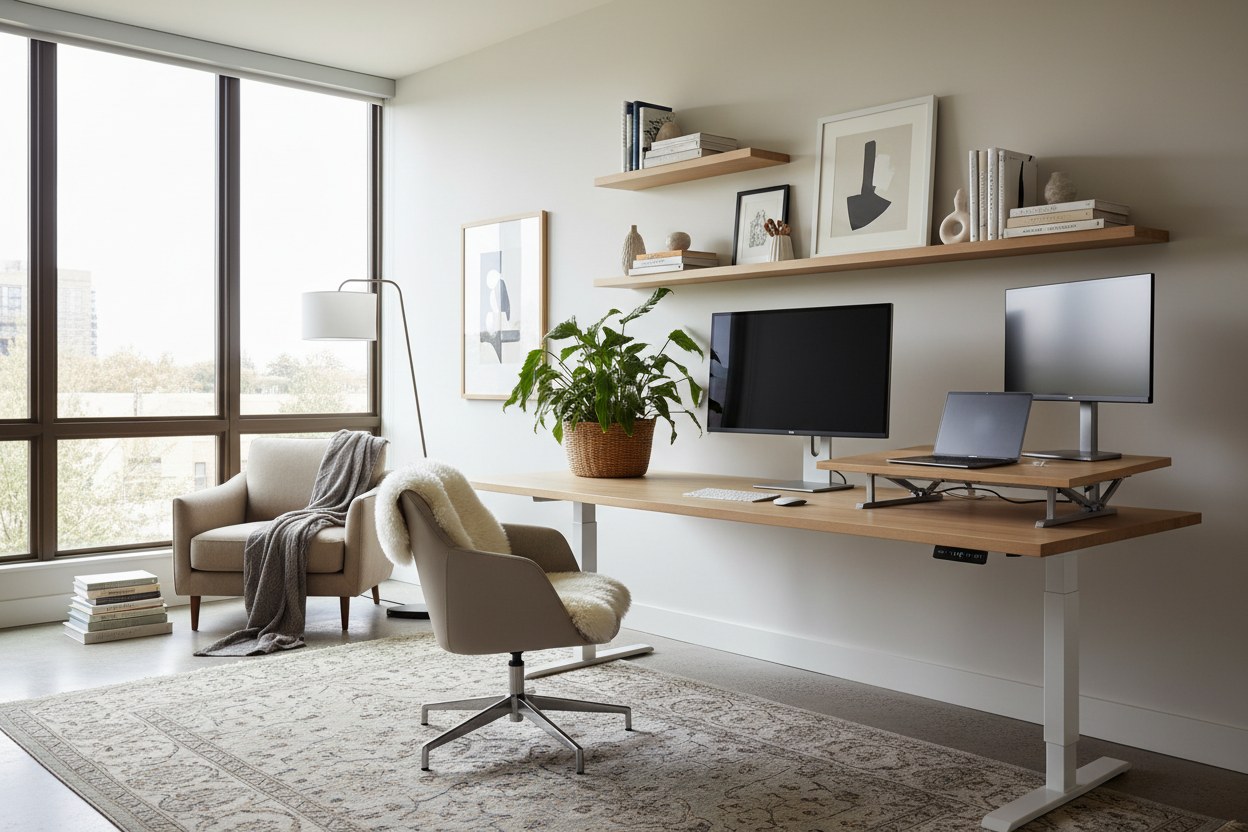
We all know the feeling of migrating from the living room sofa to the kitchen island, trying to find a comfortable spot to answer emails. If you are tired of makeshift setups and aching shoulders, you are likely wondering exactly what is needed to work from home sustainably. As an interior designer, I frequently see clients struggle to balance professional function with residential aesthetics. They either end up with a sterile corporate cubicle in their guest room or a beautiful, sculptural desk that wrecks their posture by noon.
This guide breaks down the essential furniture, spatial strategies, and ergonomic realities required to create a productive workspace. You will walk away knowing how to select pieces that support your body during an eight-hour shift while still looking like they belong in your home.
Quick Decision Guide
- Ergonomic seating is non-negotiable: Prioritize adjustable seat height and lumbar support over aesthetic appeal.
- Monitor desk depth: A standard laptop setup needs 20 to 24 inches of depth; dual monitors require 28 to 30 inches to prevent eye strain.
- Control the lighting: Layer ambient room light with a dedicated task lamp to reduce screen glare and eye fatigue.
- Plan for wire management: Desks with built-in cable trays or modesty panels hide the inevitable tangle of tech cords.
- Establish visual boundaries: Use area rugs or bookcases to define the workspace in open-concept rooms.
Space Planning & Layout
Carving Out Zones in Open Concepts
In typical North American suburban homes and open-concept apartments, carving out a workspace requires strategic zoning. You want to create a clear division between 'work' and 'home' without building new walls. I rely heavily on visual weight and negative space to achieve this. Anchoring your desk on a textured area rug instantly creates a room-within-a-room. Positioning a low-profile bookshelf perpendicular to the wall can act as a subtle room divider, shielding your monitors from the main living area.
Clearances and Traffic Flow
Never shove a desk into a corner without checking your clearances. You need a minimum of 36 inches behind your desk to push your chair back comfortably and stand up. If your workspace shares a room with a guest bed or living room seating, ensure there is at least 30 inches of walkway between the back of your office chair and the next piece of furniture. Crowding these zones creates subconscious stress before you even open your laptop.
Comfort & Ergonomics
The Desk and Chair Relationship
When clients ask me, 'what do you need for work from home to stay comfortable?' my first answer is always a highly adjustable chair. Dining chairs are built for 45-minute meals, not eight-hour workdays. Your feet should rest flat on the floor, with your knees at a 90-degree angle. If you fall in love with a vintage wooden desk that sits unusually high, you must pair it with a height-adjustable chair and a footrest to maintain proper ergonomics.
Style & Coordination
Blending Tech with Decor
The biggest challenge in home office design is preventing modern technology from clashing with your interior style. If your home leans transitional or farmhouse, a stark metal and black-plastic standing desk will look entirely out of place. Instead, look for standing desks with solid walnut or white oak tops that bring warmth and natural texture to the room. Use woven baskets to hide hard drives and routers, and swap out generic plastic desk organizers for ceramic or leather alternatives that complement your home's existing palette.
Designer's Honest Take
Early in my career, I bought a stunning architectural glass desk for my own apartment. It had incredible visual lightness, which I thought was perfect for my small floor plan. I learned the hard way that glass hides absolutely nothing. Every single black power cord, monitor cable, and sticky note was on full display, creating massive visual clutter right in my living room. I spent hours taping cables to the metal legs just to stay sane. Today, I almost exclusively recommend desks with solid tops and closed backs or built-in cable management systems. The aesthetic sacrifice of a slightly bulkier desk is entirely worth the peace of mind that comes with hidden wires.
Frequently Asked Questions
If I need to work from home what can i do with zero extra space?
Look for 'cloffice' (closet office) opportunities or utilize transitional spaces like a wide hallway or the space under a staircase. A wall-mounted floating desk paired with a stool that tucks completely underneath can turn a neglected alcove into a highly functional work zone without eating into your floor plan.
Do I really need a dedicated office chair?
If you work at your desk for more than three hours a day, yes. A proper office chair distributes your weight, supports your lumbar spine, and prevents long-term joint pain. If you hate the corporate look, many modern manufacturers now design ergonomic chairs wrapped in residential fabrics like bouclé or velvet.
What lighting is best for video calls?
Avoid sitting with a bright window directly behind you, which turns you into a silhouette. Position your desk facing a window for natural, diffused front lighting. Supplement this with a desk lamp that has an adjustable neck, allowing you to bounce light off the wall behind your monitor rather than shining it directly onto your face.


Leave a comment
This site is protected by hCaptcha and the hCaptcha Privacy Policy and Terms of Service apply.