










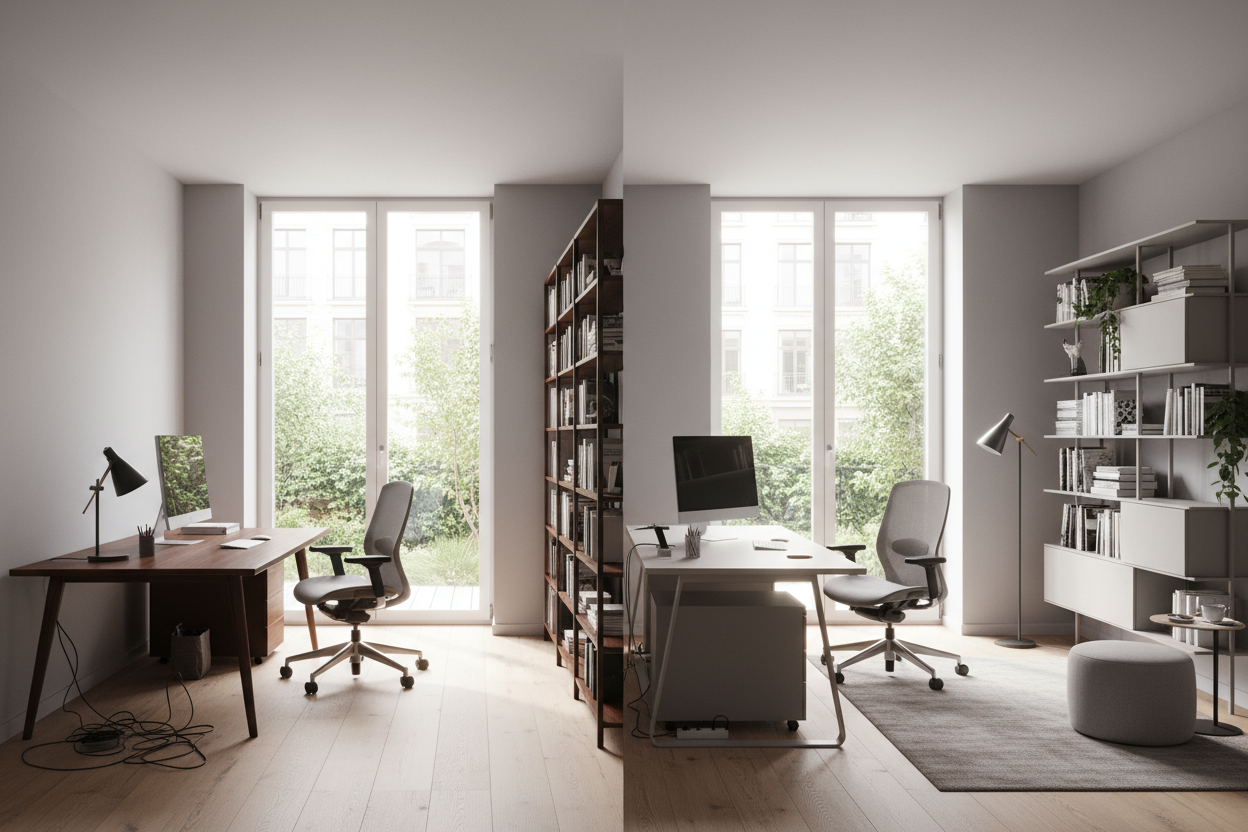
We have all been there: you set up your home workspace by shoving a desk against the nearest blank wall, expecting a surge of productivity. Instead, the room feels cramped, the afternoon glare gives you a headache, and every video call features a background of a cluttered closet. Finding the best office arrangement is rarely about buying more expensive furniture; it is about manipulating spatial flow to support focus and reduce mental friction.
Whether you are working with a dedicated suburban study or carving out a corner in a one-bedroom apartment, the way you orient your pieces dictates how the space feels. By the end of this guide, you will know exactly how to map out a floor plan that balances visual weight, ergonomics, and practical daily use.
Quick Decision Guide
- Place your desk in the "command position" facing the door to reduce subconscious stress and improve room flow.
- Keep the primary natural light source in front of or beside your monitor to prevent eye-straining glare.
- Maintain a minimum of 36 to 48 inches of clearance behind your desk chair to allow for easy movement.
- Zone your space by separating the active computer area from passive reference or reading areas.
- Anchor heavy storage pieces like bookcases on the wall opposite your desk to balance visual weight.
Mapping Out the Ideal Office Layout
The Command Position
The most common mistake I see in North American homes is the "punishment desk"—a desk pushed completely flat against a wall, forcing the user to stare at drywall with their back to the door. The ideal office layout utilizes the command position. This means floating your desk in the room or anchoring it perpendicular to a wall so you have a clear view of the entryway. This simple shift in your office arrangement immediately makes the room feel larger and gives you a professional background for virtual meetings.
Zoning for Function
A successful office room layout divides the space into distinct functional zones. You need an active zone (your desk, chair, and computer) and a supporting zone (storage, filing, or a small reading chair). If you have the square footage, separating your digital work from your analog work—like reviewing physical documents—prevents your primary desk from becoming a dumping ground for paper clutter.
Ergonomics and Clearances
Lighting and Glare Control
Lighting dictates layout. Never position your monitor directly in front of a bright, unshaded South-facing window, as the contrast will exhaust your eyes. Conversely, putting the window directly behind you turns you into a shadowy silhouette on camera. The best office layout positions your desk perpendicular to the window, allowing soft, indirect light to wash across your workspace.
Space to Move
Furniture that looks perfectly scaled on a showroom floor can easily choke a standard 10x10 spare bedroom. Always leave 36 to 48 inches of clearance between the edge of your desk and the wall or furniture behind it. This ensures you can push your chair back completely without scraping the baseboards. If you are using a lateral file cabinet, ensure you have a 30-inch radius in front of it to fully extend the drawers.
Designer's Honest Take: Lessons from My Own Projects
A few years ago, I designed an executive home office for a client in a Chicago suburb. We ordered a massive, gorgeous matte walnut desk. I confidently floated it right in the center of the room to achieve that authoritative, high-end look. It photographed beautifully.
However, I learned a hard lesson about practicality that month. Because the desk was floating, the monitor and lamp cords had to run across the floor. We used a heavy-duty rubber floor cord concealer, but the client still tripped over it twice in the first week. Additionally, the sheer visual weight of the solid wood piece swallowed the room's negative space, making the office feel heavy and stagnant. We eventually had to pivot, swapping the massive desk for a lighter, metal-framed writing desk and anchoring one side to the wall to hide the cables along the baseboard. The lesson? Floating a desk is the gold standard for layout, but if you do not have floor outlets installed, cable management will be your biggest headache.
Frequently Asked Questions
Should my desk face the window or the wall?
Ideally, neither. The most functional office arrangement places your desk perpendicular to the window. This gives you the benefit of natural light without the harsh glare on your screen or the eye strain of looking directly into the sun.
How do I arrange an office in a small bedroom?
In tight spaces, prioritize vertical storage. Use tall, narrow bookcases instead of wide credenzas to draw the eye up. If you cannot float the desk due to space constraints, place it against a wall but hang a large mirror or engaging artwork above the monitors to create an illusion of depth.
What is the rule of thumb for office walkways?
Always maintain a minimum 30-inch pathway from the door to your desk. For the area immediately behind your desk chair, you need at least 36 inches to roll back and stand up comfortably without hitting the wall behind you.

Leave a comment
This site is protected by hCaptcha and the hCaptcha Privacy Policy and Terms of Service apply.