










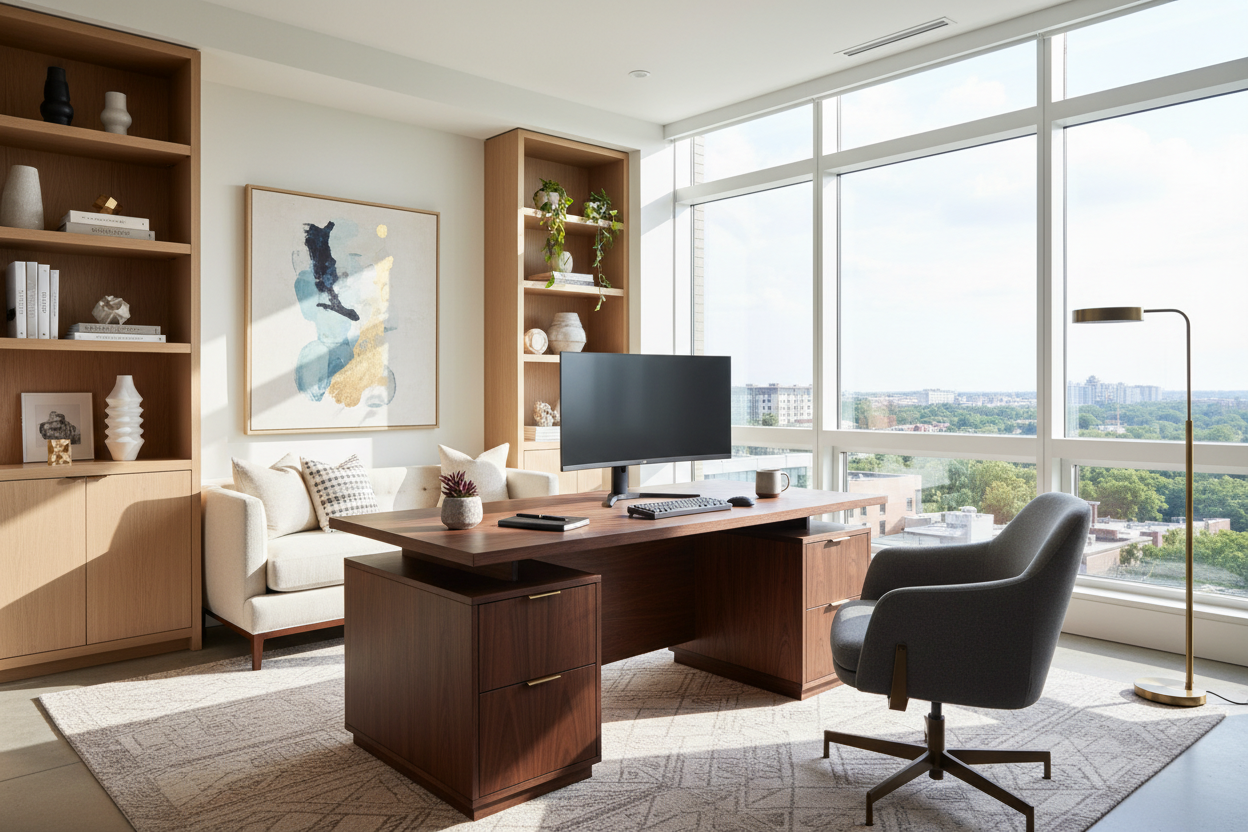
If you are still taking morning meetings from your dining table with a pile of mail just out of frame, it is time for a reset. I see countless clients struggle to balance a functional workspace with the comfortable aesthetic of their home. When a workspace feels like an afterthought, your productivity usually follows suit. The goal is to design a room that supports your daily tasks without looking like a corporate cubicle dropped into your living space.
Finding the right work from home office ideas is about marrying ergonomics with visual harmony. Whether you are outfitting a dedicated spare bedroom or carving out a nook in an open-concept living area, you need a strategy. By focusing on layout, lighting, and material choices, you can build a setup that actually makes you want to sit down and tackle your inbox.
Quick Decision Guide
- Prioritize the command position: Place your desk so you have a clear view of the door, which reduces subconscious anxiety and provides the best background for video calls.
- Layer your lighting: Never rely solely on overhead fixtures. Combine ambient room lighting with a dedicated task lamp to reduce eye strain.
- Invest in the chair, save on the desk: Your body interacts with your chair for eight hours a day. Allocate a larger portion of your budget to seating.
- Manage visual weight: In smaller rooms, choose desks with thin metal legs or open silhouettes to keep the space feeling airy.
Space Planning & Layout
Nailing the Desk Placement
The biggest mistake people make with remote office ideas is shoving a desk flat against a wall. While this feels like a space-saver, it forces you to stare at blank drywall all day. If your room dimensions allow, try floating the desk in the middle of the room or positioning it perpendicular to a window. This arrangement creates a more dynamic flow and instantly elevates the room from a makeshift study to a professional suite.
Navigating Small Footprints
When square footage is tight, you have to get creative with work from home desk ideas. Look for modular shelving units that incorporate a drop-down desktop, or utilize an underused closet by removing the doors and building a custom 'cloffice'. Ensure you leave a minimum of 36 inches of clearance behind the desk so you can comfortably roll your chair in and out without scraping the baseboards.
Achieving Focus & Function
Establishing Boundaries
If your workspace shares a footprint with a living room or bedroom, physical separation is crucial. Home office privacy ideas do not always require framing new walls. You can use an open-backed bookcase styled with trailing plants and ceramics to create a permeable barrier. Alternatively, a folding screen made of rattan or fluted glass adds architectural interest while shielding your workstation from view at the end of the day.
Managing the Clutter
Nothing ruins wfh inspiration faster than a tangle of black cords snaking across the floor. Cable management is the unsung hero of interior design. Look for desks with built-in grommets or hidden cable trays. If you are using a vintage table as a desk, mount a wire basket to the underside of the tabletop to hold power strips and excess wiring out of sight.
Aesthetics & Coordination
Blending with Your Home
Your workspace should feel like a natural extension of your home's architecture. If your house leans transitional, avoid hyper-modern, high-gloss white desks. Instead, seek out wfh office ideas that incorporate warm woods like walnut or white oak, paired with brass or matte black hardware. Introduce texture through a wool area rug or linen drapery to soften the hard edges of monitors and filing cabinets.
The Power of Negative Space
Resist the urge to fill every inch of your office with storage. Leaving empty wall space or keeping the top of a credenza mostly bare gives the eye a place to rest. This concept of negative space is vital in environments where you need to concentrate. Keep your immediate desktop limited to essential items: a laptop, a notebook, and perhaps one sculptural object or a small potted plant.
Lessons from My Own Projects
A few years ago, I bought a stunning, authentic mid-century modern teak desk for my own study. It looked incredible in photos and perfectly matched my aesthetic. However, I learned the hard way that vintage desks were not built for modern dual-monitor setups. The shallow depth meant my screens were practically touching my nose, and there was nowhere to hide the massive power brick for my laptop.
I kept it for six months out of pure stubbornness, but my neck was in constant pain. I eventually sold it and replaced it with a slightly deeper, ergonomically appropriate piece that still featured wood tones but offered the functional depth I actually needed. The lesson? Never let a beautiful silhouette override the physical requirements of your daily work.
Frequently Asked Questions
What size desk do I need for a dual-monitor setup?
For two standard monitors, you need a desk that is at least 60 inches wide and 28 to 30 inches deep. Anything shallower will place the screens too close to your eyes, leading to fatigue and headaches.
How can I make my office chair look less corporate?
If you hate the look of standard mesh office chairs, search for ergonomic chairs upholstered in performance fabrics like boucle or velvet. Alternatively, you can drape a high-quality sheepskin throw over the back of a standard chair to soften its appearance while keeping the lumbar support.
What are the best paint colors for a home office?
It depends on how you work. If you need high energy, soft warm whites or muted terracottas work beautifully. If your job is high-stress and you need a calming environment, moody greens and deep grey-blues absorb light and create a den-like, focused atmosphere.


Leave a comment
This site is protected by hCaptcha and the hCaptcha Privacy Policy and Terms of Service apply.