










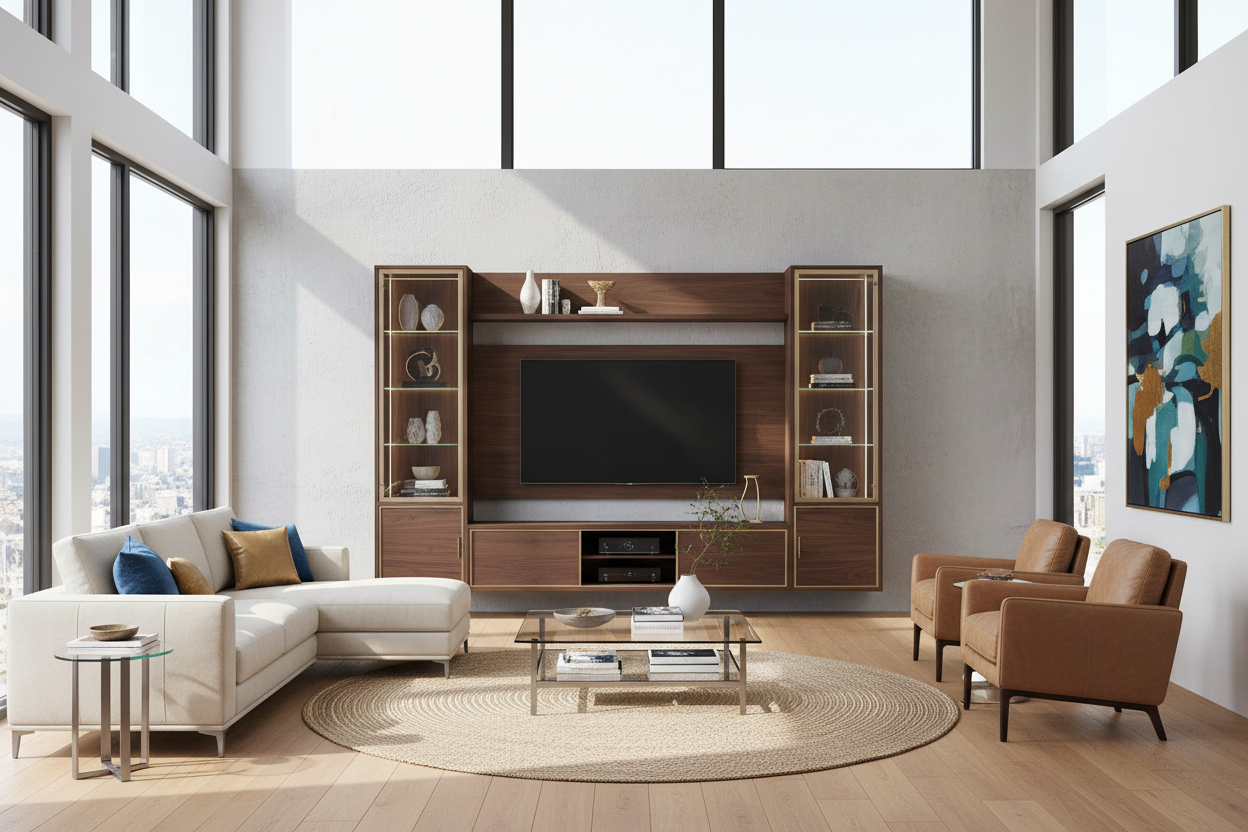
I remember the first time I hauled a 75-inch TV into my living room. It was a beast, a beautiful 4K monolith that I’d saved up for months to buy. But once I got it out of the box and onto my existing mid-century credenza, I realized I’d made a massive mistake. The TV was wider than the stand, hanging off the edges like a toddler on a barstool. It looked temporary, cheap, and honestly, a little dangerous. That’s when I realized that a 4 piece entertainment center for 75 inch tv isn’t just a luxury; for a screen this size, it’s a design necessity.
Quick Takeaways
- Scale is everything: A 75-inch TV needs a unit at least 90-100 inches wide to look balanced.
- Frame the tech: Side piers and a bridge turn a 'black void' into an architectural feature.
- Storage wins: These units hide the bird's nest of cables and gaming consoles that ruin minimalist looks.
- Room feel: One large, cohesive piece often makes a room look bigger than three small, mismatched ones.
The Minimalist Console Myth (And Why It Fails Big Screens)
We’ve been sold this idea that a TV should sit on a low, spindly credenza with nothing around it. It looks great in a staged photo with a 50-inch screen, but once you scale up to a 75-inch panel, the math changes. A screen that large is roughly 65 inches wide and weighs enough to make a cheap particle-board stand bow in the middle within a year. When you put a massive screen on standard TV stands, you create what I call the 'floating black box' effect. The TV dominates the wall, but because the furniture underneath is too small, the whole setup feels top-heavy and accidental.
I’ve seen dozens of living rooms where the homeowner tried to keep things 'airy' by using a tiny console. Instead, it just looks like they ran out of money halfway through furnishing the room. A 75-inch TV has a lot of visual weight. If you don't anchor it with furniture that matches that scale, the TV looks like a giant dark hole that sucks the life out of your decor. You need something substantial—something with actual mass—to hold that much screen without looking like a college dorm setup.
Why a 4 Piece Entertainment Center for 75 Inch TV Actually Works
The magic of a 4-piece setup is in the architecture. You have the base console, two side piers (the towers), and the bridge that connects them across the top. This creates a literal frame for your television. Instead of the TV being a piece of tech that’s just 'there,' it becomes a built-in part of the room. It’s the difference between hanging a poster with scotch tape and putting a masterpiece in a custom gilded frame. The frame tells your eye that the TV is supposed to be there.
Structurally, these units are a godsend for anyone who actually uses their living room. Those side piers are perfect for housing speakers at the correct ear level, and the overhead cabinets or bridge pieces provide a spot for accent lighting or hidden storage. I use my bridge to hide the router and a mesh node, keeping the signal strong but the hardware invisible. Plus, the sheer amount of weight distribution in a 4-piece unit means you don't have to worry about your expensive 75-inch investment ending up face-down on the rug because a spindly leg snapped.
Most 4-piece units are modular, too. This is a secret win. If you move to a house with a slightly different layout, you can often use the piers as standalone bookcases in another room. But when they are together, they create a cohesive, expensive-looking 'wall' that hides all the sins of modern living—like the twelve different remote controls and the tangled mess of HDMI cables that come with a high-end home theater setup.
Getting the Proportions Right for a Wall Unit 75 Inch TV Setup
The biggest mistake people make is buying a unit that 'just fits' the TV. If your 75-inch TV is 65 inches wide and your unit is 66 inches wide, it’s going to look cramped. You need breathing room. Ideally, you want at least 5 to 8 inches of empty space between the edge of the TV screen and the side piers. This prevents the 'casket' look where the TV is squeezed into a box. When you size a wall unit for 75 inch tv, you are actually designing the entire wall, not just a spot for the screen.
Measure your wall height, too. A full entertainment center can stand 7 or 8 feet tall. If you have 8-foot ceilings, a unit with a thick bridge might feel like it's touching the ceiling, which can make the room feel shorter. Look for a unit that leaves at least a foot of space above the bridge to let the room 'breathe.' I always tell people to tape out the dimensions on the wall with blue painter's tape before buying. It’s the only way to realize that a 110-inch wide unit is actually much larger than you imagined in the store.
Will Massive Furniture Make My Living Room Feel Tiny?
It sounds counterintuitive, but one large, well-organized piece of furniture often makes a room feel bigger than several small pieces scattered around. Why? Because it reduces visual clutter. When you have a small TV stand, a separate bookshelf, and maybe a cabinet for your media, your eye has to jump between four different 'stops' on the wall. It’s busy. It’s noisy.
A 4-piece entertainment center creates one long, continuous line. It draws the eye upward and across the room in a single sweep. This sense of continuity makes the wall feel more expansive. I’ve put these massive units in 12x15 rooms, and the owners were shocked that the room actually felt more 'designed' and less 'cramped.' The key is choosing the right finish. If you’re worried about the unit feeling heavy, go for a light oak or a soft white finish rather than a dark espresso. The lighter color will reflect more light, keeping the room bright while still giving you the storage and scale you need.
My Rules for Styling the Shelves (So It Doesn't Look Cluttered)
Once the unit is up, the temptation is to fill every single inch of those side piers with every photo frame and souvenir you own. Don't do it. That is how you end up with a 'tacky' look. The goal is to make the unit look like a curated library, not a pawn shop. I follow the 60-40 rule: 60% of the shelf space should be filled, and 40% should be empty. This 'negative space' is what makes the setup look high-end.
When you've styled a tv entertainment center correctly, you’ll notice that the TV almost disappears when it's off because the surrounding decor is so balanced. Use large-scale items: three big coffee table books stacked horizontally, a single sculptural vase, or one trailing plant like a Pothos. Avoid 'the march of the small things'—ten tiny items on one shelf will always look messy. And for the love of all things holy, use the cable management holes. If your unit doesn't have them in the right spots, take a hole saw to the back panel. Seeing a single gray power cord hanging down the back of a $2,000 unit is a tragedy.
Personal Experience: The Bowing Wood Incident
I once tried to be a minimalist. I bought a 75-inch Samsung and put it on a beautiful, thin-legged teak sideboard. It looked like a Pinterest dream for exactly three months. Then, I noticed the doors on the sideboard weren't closing right. I looked closer and realized the top was bowing significantly under the weight of the TV. The legs were starting to splay. I had to scramble to find a 4-piece unit that could actually support the weight. I ended up with a solid wood setup that weighed 300 pounds itself, and suddenly, the TV didn't look like a giant monster in the room anymore—it looked like it belonged. I learned the hard way: big tech needs big furniture.
Frequently Asked Questions
Is a 4-piece unit hard to assemble?
Honestly? Yes. It’s a weekend project. There are usually hundreds of screws and the bridge piece requires two people to lift. Do yourself a favor and use a cordless drill with a hex bit instead of the tiny Allen wrench they give you. Your wrists will thank me later.
Can I use a 4-piece unit if I want to wall-mount my TV?
Absolutely. Many units are designed with an open back specifically for this. You mount the TV to the wall studs, and then slide the console and piers around it. It gives you the 'built-in' look without the TV actually touching the furniture.
What is the best material for these units?
Avoid the super-cheap 1/2-inch MDF if you can. It sags. Look for kiln-dried hardwood or at least high-density furniture board with a real wood veneer. If the box weighs less than 100 pounds for the whole unit, it’s probably too flimsy for a 75-inch screen.

Dejar un comentario
Este sitio está protegido por hCaptcha y se aplican la Política de privacidad de hCaptcha y los Términos del servicio.