










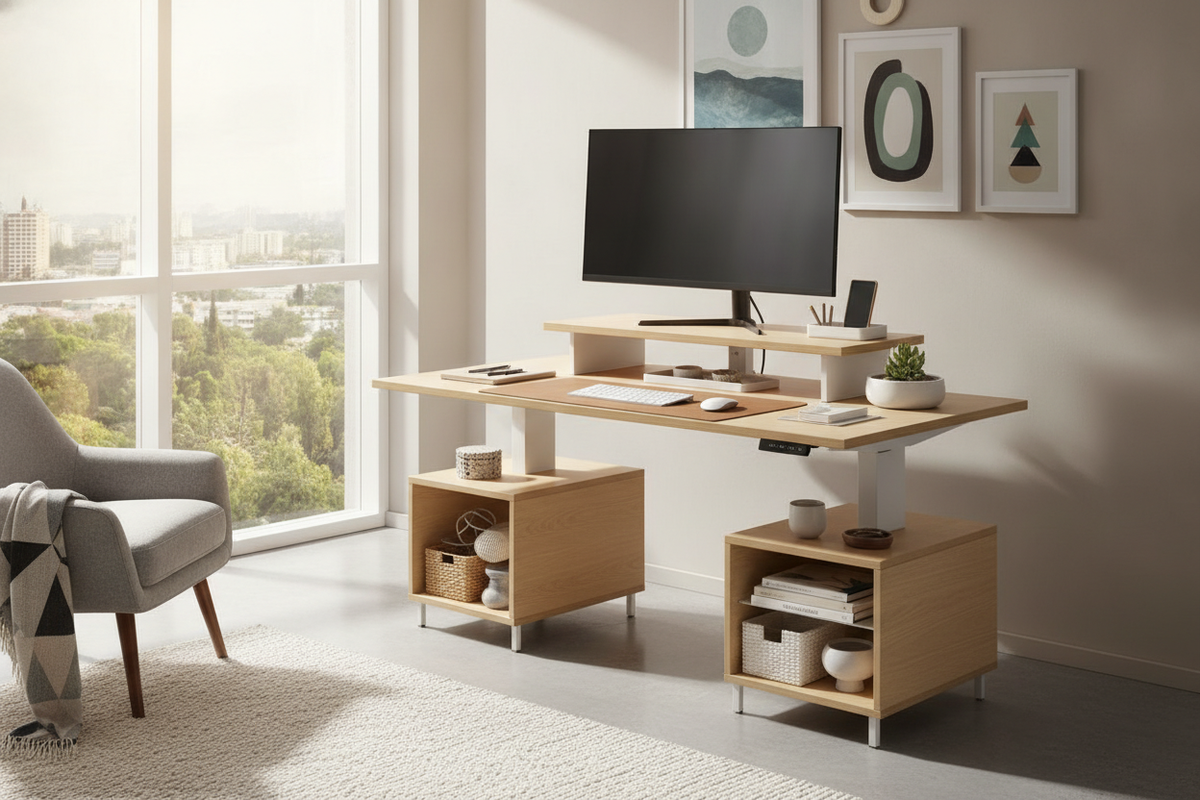
In compact living spaces, every square inch of tabletop real estate matters. Integrating a small desk with riser architecture transforms a restricted desktop from an overcrowded utility plane into a structured, multi-tiered command station. By lifting monitors, laptops, and peripheral hardware upward, you immediately reclaim surface area beneath the display level for daily workflow essentials.
Architectural Role of Risers on Compact Desks
The primary spatial challenge of small workstations is horizontal crowding. When monitors, keyboards, notebooks, and charging docks compete on a single planar level, workspace usability drops. An elevated shelf or dedicated riser establishes distinct functional tiers: an eye-level viewing plane and a lower tactile interaction plane.
When surface area is limited, elevating your screen on a dedicated stand helps recover valuable tabletop depth for essential peripherals. This vertical separation ensures that your primary working area remains uncluttered, allowing a compact surface to feel as capable as a full-sized executive workstation.
Riser Typologies: Built-In Shelving vs. Sit-Stand Converters
Choosing the right configuration depends on whether your daily routine calls for static organization or dynamic postural shifts throughout the day.
- Integrated Fixed Risers: Built-in shelving units anchored directly to the desktop framework. These models offer exceptional structural rigidity, built-in cable passages, and matching material finishes, creating a unified architectural look.
- Adjustable Desktop Converters: Units like a standing desk converter for small desk setups sit atop your existing workstation. They utilize gas-spring or scissor-lift mechanisms to raise your keyboard and screen to standing heights without requiring a full furniture replacement.
- Modular Surface Risers: Freestanding monitor shelves that can be positioned, rotated, or removed based on changing hardware demands.
When selecting a small sit stand desk converter, focus on vertical lift trajectories. Compact workstations benefit most from vertical x-frame mechanisms that lift straight up rather than arcing outward, keeping the center of gravity directly over the desk footprint.
For tips on keeping elevated desktop units visually cohesive within small home offices, explore styling top-tier standing desk converters with minimalist accessories.
Dimensional Categories and Footprint Compatibility
Proportion and balance are vital when outfitting a compact desk. A riser that is too deep consumes the wrist rest zone, while one that is too narrow fails to support hardware footprints cleanly.
To maintain balance, aim for a riser depth that occupies roughly one-third of your overall desktop depth. This proportion leaves generous clearance for keyboard travel, mouse movement, and manual writing tasks. Furthermore, check the base width of your riser against the desktop frame to avoid overhang that could compromise structural balance.
If desktop converter weight exceeds your small workstation limits, upgrading to a standalone ergonomic motorized sit-stand desk provides seamless height adjustments across the entire surface.
Vertical Storage Zoning and Under-Riser Utility
The space carved out beneath a desktop riser represents prime organizational territory. By treating this under-shelf niche as an intentional storage zone, you keep the main desk surface pristine.
- Keyboard Parking: Slide compact tenkeyless or low-profile keyboards completely under the riser when shifting to analog writing, sketching, or reading tasks.
- Low-Profile Organization: Incorporate felt or wooden stationery trays beneath the shelf to house stylus pens, notebooks, sticky notes, and thumb drives.
- Hardware Concealment: Position USB docking hubs, external hard drives, and power banks within the rear under-riser cavity to keep connectivity clean yet accessible.
Material Palettes and Aesthetic Integration
Because compact desks often sit within multipurpose spaces like bedrooms or living room alcoves, visual lightness is paramount. Bulky or overly industrial setups can dominate a room visually.
Selecting a stand up desk converter white finish or a light natural wood grain reflects ambient daylight, softening the silhouette of technical gear. White frames paired with warm oak accents or brushed metal components introduce a modern, airy character that blends seamlessly into residential décor schemes.
Room Layout Strategies, Cable Paths, and Ergonomic Flow
Positioning your compact desk near natural light sources enhances daytime productivity, but screen glare must be managed through perpendicular window placement or angled riser orientations. Cable management is equally critical: route monitor power and data cables along the rear supports of the riser using adhesive clips or hook-and-loop ties to keep lines hidden from view.
In tight quarters, adjacent storage pieces help absorb overflow items. Pairing your compact workstation with matching minimalist storage credenzas in adjacent living zones keeps office clutter off the main desktop, preserving an inspiring, balanced workspace.


Dejar un comentario
Este sitio está protegido por hCaptcha y se aplican la Política de privacidad de hCaptcha y los Términos del servicio.