










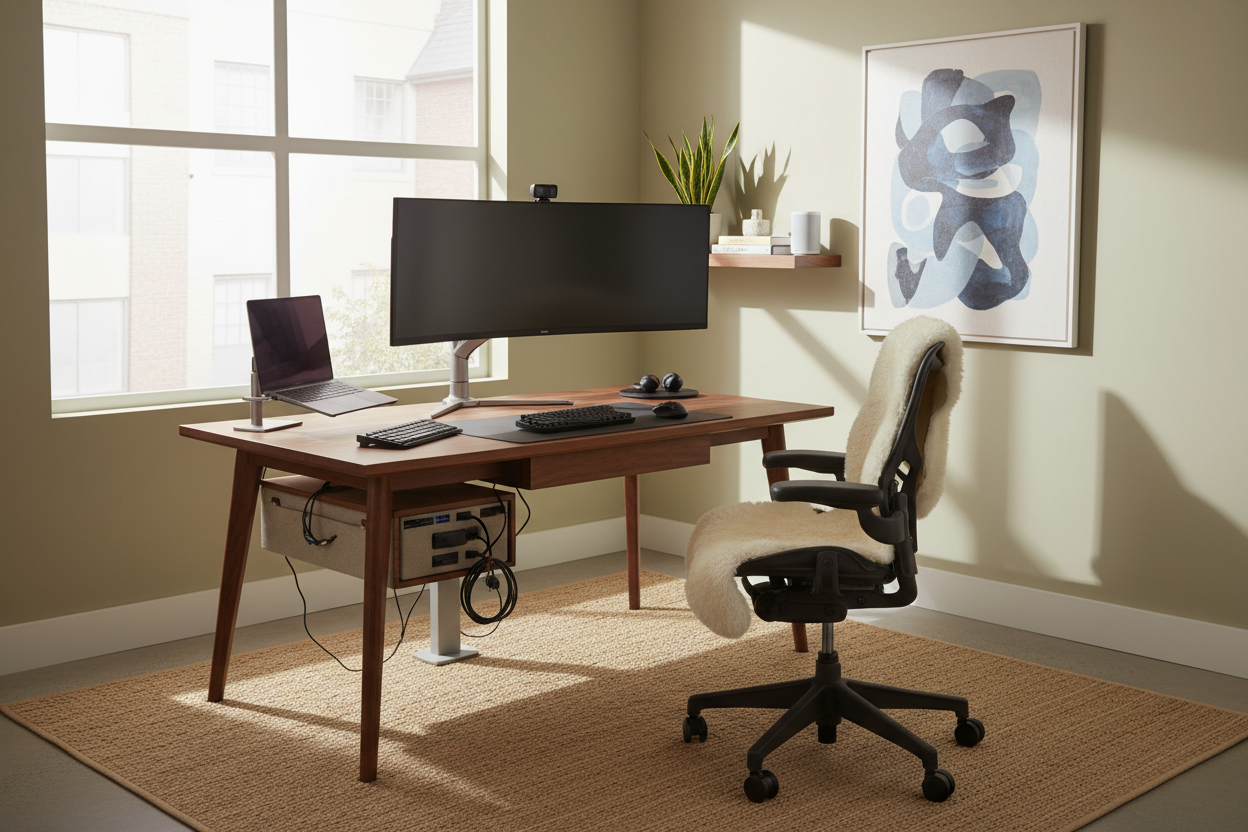
There is nothing quite as frustrating as investing in a beautiful mahogany writing desk or a sculptural ergonomic chair, only to have the visual serenity shattered by a tangle of black wires and harsh, clinical lighting. As designers, we often see clients prioritize the hardware specs but neglect the integration of that hardware into the room's design scheme. Balancing high-performance gear with a sophisticated interior requires a strategic approach.
If your home office feels more like a server room than a sanctuary, you are likely missing the intersection of design and utility. Below, I outline essential **technology tips for working from home** that prioritize both your productivity and the aesthetic integrity of your space.
Quick Decision Guide: Tech Integration Essentials
- Lighting Temperature: Aim for 3000K-4000K bulbs to balance warmth with alertness; avoid harsh daylight bulbs (5000K+) in residential settings.
- Cable Management: Prioritize desks with integrated grommets or modesty panels to conceal wiring.
- Monitor Placement: Ensure screens are at eye level to maintain a neutral neck spine position, reducing physical strain.
- Acoustics: Incorporate soft textiles (rugs, drapery) to dampen the echo caused by hard tech surfaces.
- Connectivity: Invest in a high-quality docking station to reduce the number of cables running to your laptop.
Illumination: Sculpting with Light
Lighting is rarely treated with the gravity it deserves in home offices. Poor lighting doesn't just look bad on video calls; it creates eye strain that ruins your focus. From a design perspective, we want to layer light rather than relying on a single overhead source.
The Video Call Balance
Avoid placing your desk with a window directly behind you, as this creates a silhouette effect where you become a dark shadow on screen. Instead, position your desk perpendicular to the window. Supplement this with a task lamp that offers an adjustable arm. Look for fixtures with a high CRI (Color Rendering Index) of 90 or above. This ensures that the finishes in your room—and your skin tone—look natural rather than washed out.
The Art of Concealment: Cable Management
One of the most vital tech tips for working from home is mastering the art of the invisible cable. Visual clutter creates mental clutter. When selecting a desk, I always advise clients to look for 'modesty panels' or hidden channels within the legs.
If you are working with a vintage piece or a parson-style desk with open legs, you must be more creative. Use color-matched cable sleeves that blend with your wall paint or the desk leg finish. Adhere cable trays to the underside of the desktop to hold power bricks. The goal is to ensure that from the doorway, the technology feels wireless, even if it isn't.
Ergonomics Meets Aesthetics
Technology dictates our posture. The relationship between your chair, your keyboard, and your monitor determines your physical health. However, ergonomic furniture often looks industrial and jarring in a residential setting.
Choosing the Right Support
You do not always need a mesh gaming chair to achieve comfort. Many high-end contract furniture brands now produce task chairs wrapped in linen, velvet, or high-grade leather that hide advanced lumbar support mechanisms inside upholstered shells. When positioning your monitor, use a monitor arm rather than the factory stand. A monitor arm clears valuable desk real estate for sketches or notebooks and allows you to adjust the screen height effortlessly, maintaining a clean, floating silhouette.
Lessons from My Own Projects: The Glass Desk Trap
I feel compelled to share a specific failure from my own home office journey to save you the headache. A few years ago, I fell in love with a minimalist, tempered glass desk. It was architectural and stunning. I bought it immediately.
It was a disaster for a working environment. Why? Because there is absolutely nowhere to hide a cable. Every USB cord, power strip, and dropped pen was visible through the work surface. I spent weeks trying to use clear zip ties and adhesive clips, but it never looked polished. The dust also settled on the glass and was highlighted by the glow of my monitors, requiring constant cleaning.
I learned the hard way that if you have a heavy tech setup (dual monitors, webcam, external mic), you need a desk with mass and storage. Now, I use a solid walnut desk with a false back panel. It hides a chaotic nest of wires that no one—including me—has to see.
Conclusion
Integrating technology into your home is not about hiding your tools, but about giving them a designated, intentional place within the design. By controlling your lighting, managing your cables, and selecting furniture that bridges the gap between comfort and style, you create a workspace that invites creativity rather than stress. Implement these changes, and you will notice a shift not just in how your room looks, but in how you feel while working in it.
Frequently Asked Questions
How do I hide the router if it needs to be on my desk?
If your router must be visible for signal strength, try disguising it. Place it inside a decorative woven basket with a hole cut in the back for wires, or camouflage it among books on a shelf. Just ensure the enclosure is ventilated so the device doesn't overheat.
What is the best desk depth for a multi-monitor setup?
For a dual-monitor setup, aim for a desk depth of at least 30 inches (approx. 76 cm). This allows you to place the screens at a comfortable viewing distance (about an arm's length away) while leaving room for a keyboard and paperwork.
Are standing desk converters worth the aesthetic compromise?
Standing desk converters can be bulky and disrupt the visual line of a desk. If possible, I recommend investing in a full sit-stand desk with a laminate or wood top that matches your room's decor. If you must use a converter, choose one with a slim profile and a finish that matches your existing desktop to minimize visual weight.

Leave a comment
This site is protected by hCaptcha and the hCaptcha Privacy Policy and Terms of Service apply.