










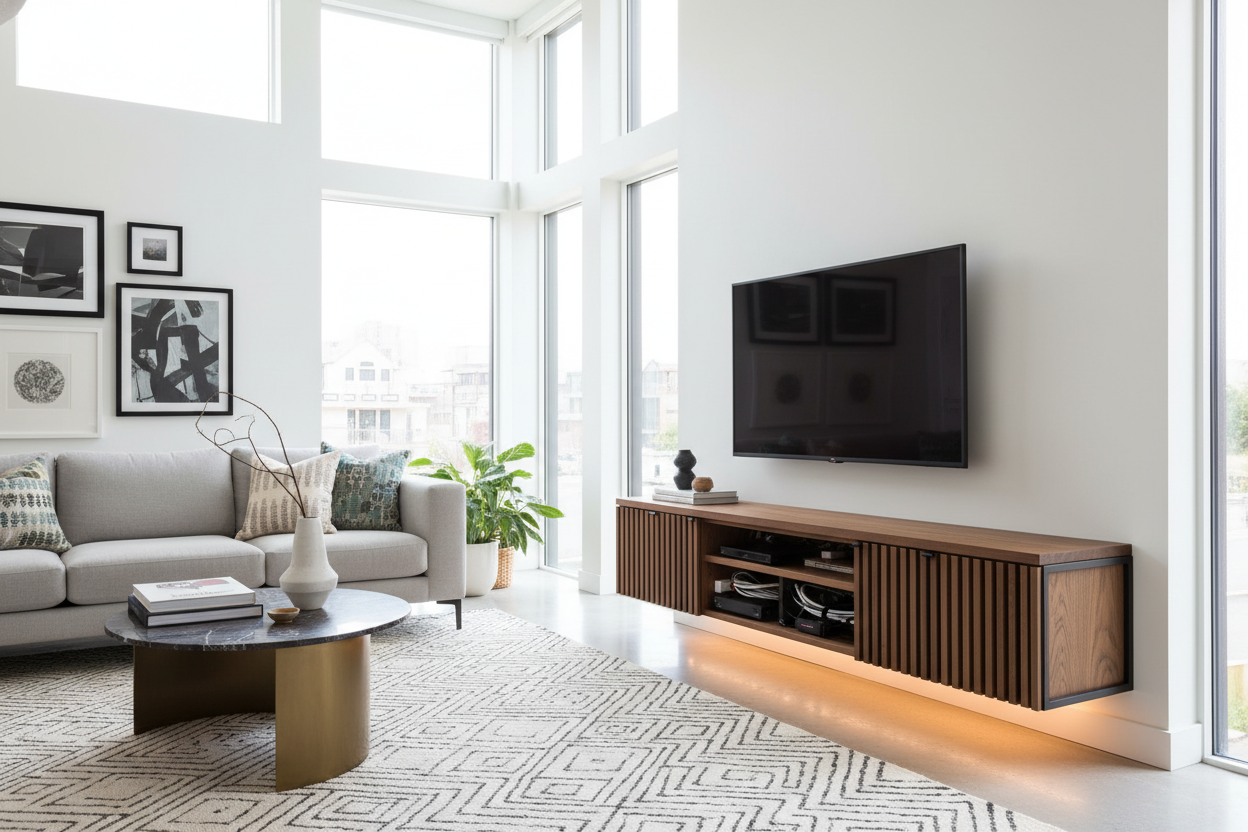
I spent three hours mounting my new 65-inch OLED last month. When I finally stepped back to admire the 'floating' effect, I didn't see a sleek tech masterpiece. I saw a tangled black waterfall of HDMI cables, power cords, and a dusty router dangling by its antenna. It looked like my living room was being slowly digested by a robot octopus. This is the moment most people realize a media cabinet for wall mounted tv isn't just a style choice—it is a survival tool for anyone who hates visual clutter.
- Floating units need wall studs; never trust basic drywall anchors with your expensive tech.
- Open shelves show every wire; stick to enclosed cabinets if you are not a cable-management pro.
- Measure your largest power brick before buying a slim unit to ensure the doors actually close.
- Back panels with pre-cut holes save you from a DIY disaster with a hole-saw bit.
The Ugly Truth About the 'Floating Screen' Look
We have all seen the marketing photos. A paper-thin TV sits on a pristine white wall with absolutely nothing beneath it. No wires, no boxes, no remotes. It is a total lie. Unless you are prepared to cut holes in your drywall and fish cables through the studs—which is a weekend-ruining project—you are going to have wires. A modern wall mount tv cabinet is the bridge between that minimalist dream and the reality of owning a gaming console and a soundbar.
The problem is that most people buy the TV first and the storage second. You end up with a high-end screen and a mess of black plastic 'vines' hanging down. A unit for under wall mounted tv setups needs to do more than just look pretty; it has to act as a hub. If it doesn't have a specific plan for where those wires go, you are just moving the mess from the floor to the wall.
Does a Unit for Under Wall Mounted TV Actually Hide the Mess?
In my experience, whether a cabinet works depends entirely on the 'cord drop.' If your cabinet sits six inches below the TV, you still have six inches of visible wire. The trick is either using a cord cover painted to match your wall or choosing a cabinet tall enough to sit just an inch or two below the screen. I eventually realized that switching to a modern wall cabinet for living room storage was the only way to reclaim my floor space without looking like a college dorm.
You also have to consider the 'brick' problem. Most wall-mounted units are shallow to keep that 'floating' look, but your Xbox or your cable box has a massive power brick that needs a home. Look for units that have a recessed back panel. This creates a hidden pocket between the wall and the cabinet where you can zip-tie those bulky power strips. If the back is flush against the wall, you are going to find yourself frustrated when the cabinet won't sit flat because of a single plug.
Why Wall Hanging TV Shelves Usually Fail
I have tried the 'minimalist' route with wall hanging tv shelves, and honestly, I regretted it within an hour. Because shelves are open on the sides and bottom, every single cable is visible from your sofa. You can try to hide them behind a stack of books, but the second you need to plug in a controller, the whole illusion falls apart. An enclosed wall mounted tv case is almost always better because it provides a literal 'box' to shove the chaos into.
What to Look For (If You Hate Seeing Wires)
If you are shopping right now, prioritize cable management over everything else. You want a unit with 'pass-through' holes on the top and the interior shelves. This allows you to run a wire from your soundbar on top of the cabinet down to the power strip inside without it ever being seen from the front. I personally love the freely arranged TV stand with LED because the ambient light actually masks the shadows where wires usually hide.
Also, do not overlook the power of drawers. A wall mounted tv cabinet with drawers is a lifesaver for those of us with 'remote fatigue.' I have three different remotes, a pair of gaming headsets, and a collection of charging cables that I don't want on display. Drawers keep the top surface clean, which makes the whole 'wall mount' aesthetic actually work. If the top of your cabinet is covered in junk, the floating effect is lost.
The Floor-Standing Alternative: Sometimes It is Just Easier
I will be the first to admit that wall mounted tv shelving units are not for everyone. If you live in a rental with thin walls or you have a massive AV receiver that weighs 20 pounds, a floating unit might literally rip out of your wall. I have seen it happen, and it is not pretty. Sometimes, a floor-standing unit is just the smarter move for heavy tech.
If you have a massive setup, just get an adjustable length media console that sits on the floor. It is significantly easier than hunting for studs and worrying about weight limits. You can browse TV stands to see why the extra depth matters for ventilation. Heavy-duty receivers generate a lot of heat, and a cramped wall unit can turn into a literal oven for your electronics.
Real Talk: Will It Look Like a Corporate Boardroom?
This is my biggest gripe with most wall mount tv stand images you see online. They look sterile. To keep your living room from feeling like a Best Buy showroom, you have to style the cabinet like actual furniture. This means adding organic textures. Place a trailing plant (like a Pothos) on one end to break up the hard horizontal lines. Add a few ceramic vases or some textured books.
The goal is to make the cabinet look like it belongs in a home, not an office. Avoid the 'all-black' tech look if you can. A wood-tone or a matte white finish helps the unit blend into your decor rather than standing out as a 'tech station.' When you balance the electronics with some personality, the media cabinet stops being a utility box and starts being a design choice.
My Biggest Mistake
When I installed my first wall unit, I didn't check the depth of my HDMI cables. I bought a beautiful, slim cabinet that was only 10 inches deep. My cables stuck out 3 inches from the back of my receiver, meaning I couldn't close the cabinet doors. I had to buy 90-degree HDMI adapters just to make it work. Measure your plugs, not just your devices!
FAQ
How high should I mount my media cabinet?
Generally, you want the bottom of the cabinet to be about 10 to 12 inches off the floor. This leaves enough room for a vacuum (or a Roomba) to get under it without it looking like it is hovering too high.
Can a floating cabinet hold a PS5?
Yes, but check the depth. A PS5 is surprisingly large. You will need a cabinet that is at least 14 inches deep if you want to hide it behind a door, and make sure there is a hole for ventilation so it doesn't overheat.
Do I really need to find studs?
Yes. Absolutely. Do not trust toggles or plastic anchors for a media cabinet. Between the weight of the wood and the weight of your gear, you need to be screwed directly into at least two wooden or metal studs.

Leave a comment
This site is protected by hCaptcha and the hCaptcha Privacy Policy and Terms of Service apply.