










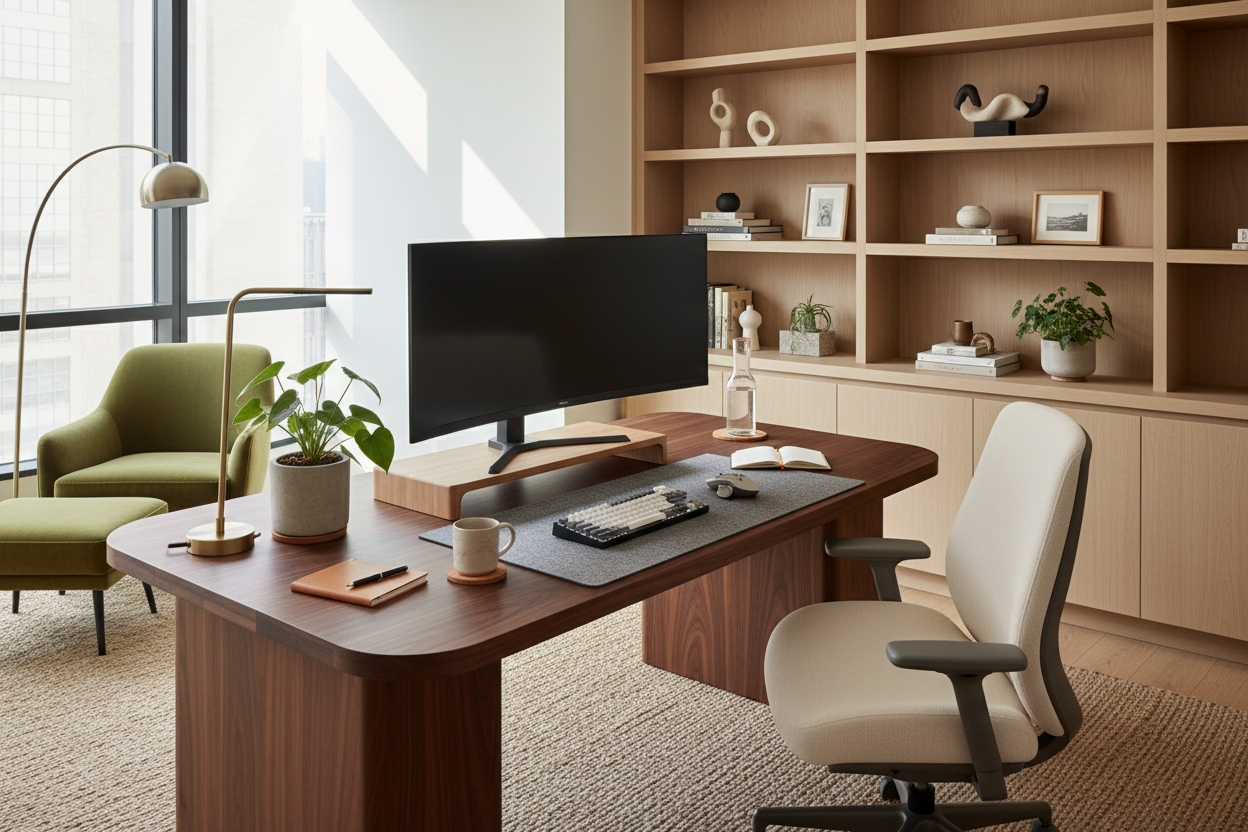
There is a distinct tension in modern interior design: the battle between the utilitarian needs of a workspace and the curated aesthetic of a home. We often sacrifice the latter for the former, filling our sanctuaries with unsightly plastic and tangled wires in the name of productivity. However, as a designer, I argue that your environment dictates your output. Finding the best work from home accessories is not merely about purchasing gadgets; it is about curating a landscape that supports your posture while complementing your interior architecture.
Key Features to Look For
- Material Continuity: Ensure accessory finishes (walnut, brass, matte black) match or intentionally contrast with your existing furniture palette.
- Ergonomic Profile: Look for adjustable heights and angles that align with human factors engineering, not just static design.
- Visual Weight: In smaller spaces, opt for acrylic or slim-profile metal accessories to maintain an open, airy feel.
- Cable Management Potential: High-quality accessories often have built-in channels to hide unsightly cords.
The Intersection of Ergonomics and Aesthetics
When selecting the best wfh accessories, the primary error I see homeowners make is prioritizing function in a vacuum. A monitor riser might prevent neck strain, but if it is a bulky block of injection-molded plastic, it disrupts the visual harmony of the room. Look for risers crafted from bent plywood or solid timber that echo the silhouette of your desk. The goal is to create a seamless transition between your technology and your furniture.
Lighting: The Anchor of Your Desk Setup
Lighting is often an afterthought, yet it defines the mood of the space. Overhead lighting is rarely sufficient for focused tasks. When sourcing desk lamps, consider the color temperature. A tunable LED lamp allows you to shift from a cool, alertness-inducing 5000K during the morning to a warm, ambient 2700K in the evening. From a styling perspective, treat the lamp as a sculptural element. An articulated brass arm adds a mid-century modern touch, while a minimal matte bar light suits a contemporary, industrial layout.
Textural Elements and Acoustics
Hard surfaces create visual and acoustic harshness. Introducing a desk mat is one of the most effective ways to soften the workspace. High-density wool felt or full-grain leather mats not only improve the tracking of your mouse but also dampen the sound of typing and provide a tactile, warm surface for your wrists. This layering of texture adds depth to the design, preventing the "sterile office" look.
My Personal Take on Best Work From Home Accessories
I learned a hard lesson about material selection during a project for a client in a drafty, pre-war brownstone. I had specified a sleek, anodized aluminum laptop stand and matching wrist rest because the industrial silhouette looked incredible against the exposed brick. Two weeks later, the client called me. The metal was freezing to the touch in the winter mornings, making it uncomfortable to start work.
We swapped them out for walnut accessories. Not only did the wood warm up the visual palette, but it was also physically warmer to the touch. Another detail often overlooked: avoid cheap "vegan leather" (PU) desk mats if you drink hot coffee while you work. I have seen them warp and develop permanent heat rings within a month. In my own studio, I strictly use saddle leather—it patinas beautifully over time, turning coffee spills and pen marks into character rather than damage.
Curating Your Productive Sanctuary
Your home office should not feel like a cubicle transplanted into your living quarters. By selecting accessories that honor honest materials and sound ergonomic principles, you create a space that invites creativity rather than demanding labor. Invest in pieces that age well, feel good to the touch, and elevate the overall design language of your home.
Frequently Asked Questions
How do I choose the right size desk mat?
Ideally, your desk mat should be deep enough to accommodate your keyboard and mouse with at least two inches of clearance above and below. Visually, it should frame your primary work zone without covering the entire beauty of the desktop wood grain.
Are monitor arms worth the investment over stands?
From a space-planning perspective, absolutely. Monitor arms float the screen, reclaiming valuable desk real estate underneath for documents or trays. This negative space reduces visual clutter, making the desk feel larger and more organized.
What is the best lighting position for video calls?
Avoid placing your primary light source directly behind you, as this silhouettes your face. Place your light source behind your monitor, angled slightly downward at 45 degrees toward you, to provide soft, diffuse illumination that flatters the face and reduces eye strain.


Leave a comment
This site is protected by hCaptcha and the hCaptcha Privacy Policy and Terms of Service apply.