










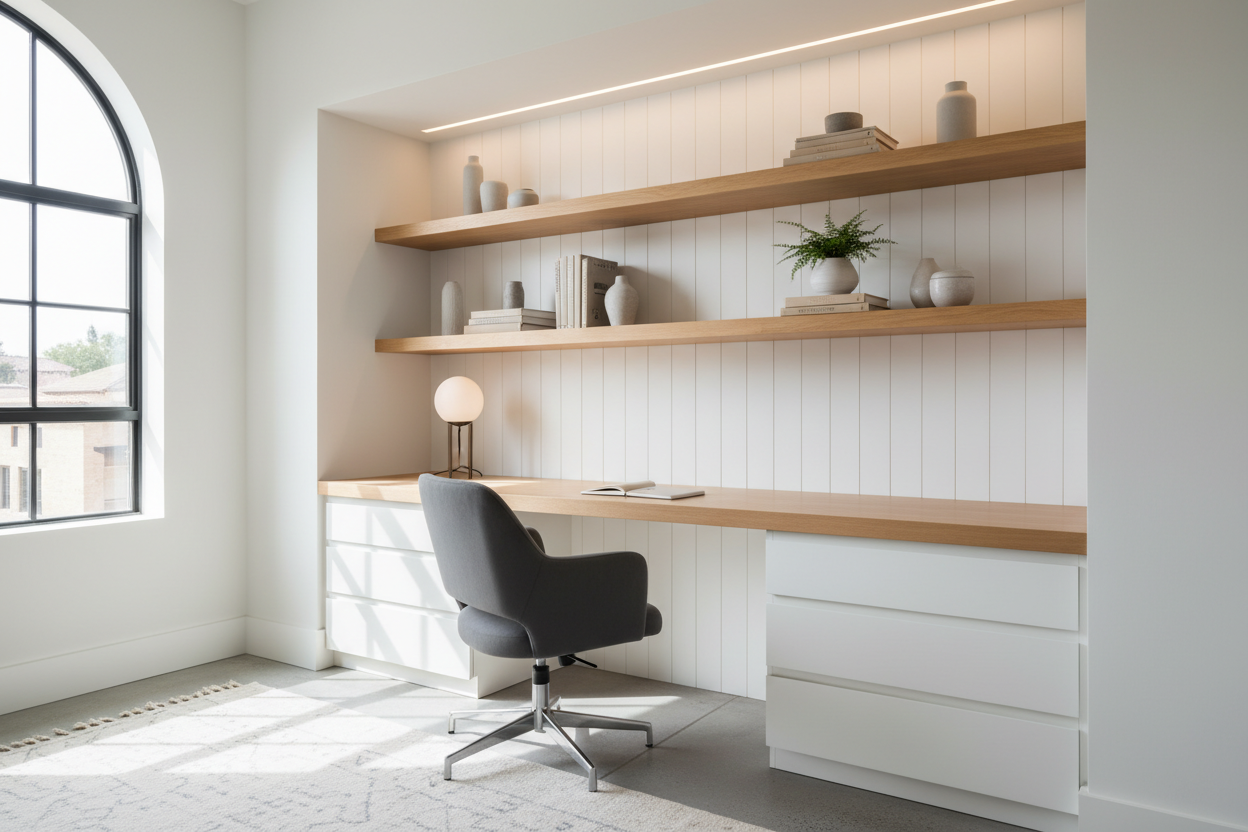
Every home seems to have that one awkward architectural pause—an alcove beside a chimney breast, the dead space under a staircase, or a closet that serves no real purpose. As an interior designer, I see these not as wasted square footage, but as opportunities for high-value millwork. Implementing smart built in desk nook ideas allows you to reclaim this space, creating a dedicated work zone that feels intentional rather than improvised.
Quick Decision Guide: Key Design Elements
Before calling a carpenter or sketching your layout, consider these four critical factors to ensure your nook is functional, not just decorative.
- Depth Requirements: A functional desk needs a minimum depth of 20–24 inches (50–60cm) to accommodate a laptop and allow for comfortable wrist placement.
- Material Selection: Choose solid wood or high-grade plywood with hardwood edging for the desktop to prevent sagging; avoid standard particle board for spans over 30 inches.
- Lighting Strategy: Plan for hardwired under-cabinet lighting or recessed puck lights early to avoid unsightly cords cluttering a small surface.
- Power Access: Locate outlets above the desktop surface or use grommets for cable management to keep the workspace clean.
Architectural Integration and Layout
The success of a built in nook desk relies heavily on how well it integrates with the existing architecture. Unlike freestanding furniture, a built-in should look like it was part of the original floor plan. If you are working with an alcove, the desktop should run wall-to-wall without gaps. For distinct separation, consider painting the entire nook—walls, shelves, and ceiling—a shade darker than the rest of the room. This creates a visually contained "zone" without needing physical dividers.
Designing a Desk Nook with Shelves
Verticality is your best asset in a compact footprint. Designing a desk nook with shelves requires a balance between open display and concealed storage. I often recommend a "two-thirds" rule: keep the bottom 18 inches above the desk clear (or use a shallow picture ledge) to prevent the space from feeling claustrophobic while you are seated.
Above that clearance zone, floating shelves offer a modern, airy silhouette, while cabinetry with doors provides necessary concealment for printers and paperwork. If you choose open shelving, ensure the thickness of the shelves matches the thickness of the desktop for a cohesive, bespoke look.
Materiality and Finish
The tactile experience of a desk is paramount. You will be touching this surface for hours every day.
Solid Wood vs. Veneer
For the desktop, solid hardwood (like White Oak or Walnut) is the gold standard for durability and refinishing potential. However, high-quality architectural plywood with a solid wood edge band is a stable, cost-effective alternative that resists warping better than solid wood in fluctuating humidity. Avoid melamine or thermofoil for the main work surface, as they tend to chip at the edges and cannot be repaired.
The Importance of Edge Banding
If you are painting the unit, using MDF is acceptable, but pay attention to the "nosing" or front edge. I always specify a 1.5-inch to 2-inch face frame on the front of shelves and the desk. This adds visual weight, making the joinery look substantial and expensive, rather than flimsy.
Ergonomics in Small Spaces
A beautiful desk is useless if it causes back pain. The standard desk height is 29 to 30 inches. However, in a nook, you must account for the chair. Ensure the opening under the desk is at least 24 inches wide to allow a standard office chair to roll in. If the nook is shallow, consider a backless stool or a chair with a low profile that can be tucked completely under the desk when not in use to maintain traffic flow.
My Personal Take on Built In Desk Nook Ideas
I learned a hard lesson about structural integrity on a project in a Brooklyn brownstone a few years ago. We designed a stunning, minimalist floating desk that spanned about 50 inches across an alcove. It looked incredible in photos—clean lines, no brackets, just pure floating timber.
However, the first time the client sat down to type, the monitor wobbled. We had used heavy-duty floating shelf brackets, but we hadn't accounted for the "dynamic load" of typing and leaning elbows. The micro-vibrations were maddening. We had to go back in and retrofit a subtle timber cleat along the back and side walls to stabilize it.
The lesson? Never sacrifice stability for aesthetics. If you are spanning more than 36 inches, you need substantial support. Now, I always insist on a hidden cleat system or stiffeners underneath the desktop, even if it compromises the "floating" look slightly. A desk that doesn't bounce is a luxury in itself.
Conclusion
Creating a dedicated workspace within your home doesn't require a spare room; it requires vision. By utilizing dead space and adhering to principles of good joinery and ergonomics, you can craft a built-in desk nook that adds value to your property and structure to your workday. Measure twice, prioritize lighting, and choose materials that age gracefully.
Frequently Asked Questions
How deep should a built-in desk be?
Ideally, a built-in desk should be at least 20 to 24 inches deep. Anything shallower than 20 inches makes it difficult to use a laptop comfortably without feeling crowded by the wall in front of you.
Can I build a desk nook in a closet?
Yes, converting a closet into a "cloffice" is a popular solution. The key is to remove the header (the wall above the door frame) if possible to open up the height, and install adequate overhead lighting since closets rarely have natural light.
What is the best wood for a painted built-in desk?
If you plan to paint the unit, high-grade Birch plywood or moisture-resistant MDF are excellent choices. They provide a smooth, grain-free surface that takes paint well. Just ensure the desktop surface is sealed with a durable enamel or polyurethane topcoat to prevent scratching.

Leave a comment
This site is protected by hCaptcha and the hCaptcha Privacy Policy and Terms of Service apply.